
Share your experience of your television
Tell us how old your TV is, what you use with it and what you would look for next time. Your answers are combined with other people's and reported only as totals.
Start the televisions and home entertainment systems surveyAbout 5 minutes. No account needed. You can stop at any time.
What this topic covers
Home entertainment systems are the screens and sound equipment people use to watch television, films, sport and online video, and to play games or listen to music at home. For most households this centres on one main television in the living room, sometimes with smaller sets in bedrooms or kitchens.
Around the television sit several related devices and services:
- Sound equipment: sound bars, separate speakers, subwoofers and surround-sound systems.
- Sources: broadcast aerials, satellite dishes, cable or internet television boxes, streaming sticks, games consoles and disc players.
- Smart features: apps for streaming services built into the television itself.
- Projectors and screens, used by some households instead of, or as well as, a large television.
- Mounts, stands and cables that hold and connect everything.
This topic looks at what people own, how they choose new equipment, what they pay, and when and why they replace it.
How people use the main television
The main television has many jobs. In one home it may show the evening news, a children's cartoon in the morning, a football match at the weekend, a streaming series at night and a video call with relatives abroad on Sunday. Households differ in how much they still watch live broadcast television and how much they watch through apps.
Patterns that surveys often explore include:
- how many televisions a household has, and where they are;
- how many hours the main set is on, and who chooses what to watch;
- how much viewing is live broadcast, recorded, or streamed on demand;
- whether people watch with others or alone;
- whether the television is used for games, music or video calls.
Example
A household of three generations shares one large television. The grandparents watch broadcast news and religious programmes during the day. The parents stream series in the evening. A teenager uses it for games at the weekend but mostly watches on a phone. When the family discusses a new set, each person cares about something different: clear speech, a large screen, and a fast response for games.
Features people compare
Television buyers face a long list of features, many described with technical terms. The ones people mention most often fall into a few groups:
- Screen size, usually measured diagonally in inches. Larger screens have become cheaper, and many people buy a larger set than the one they are replacing.
- Resolution, such as high definition (HD), 4K and 8K. Higher resolution shows more detail, especially on large screens viewed up close.
- Panel type, such as LCD with LED backlighting or OLED. Panel types differ in contrast, brightness, viewing angle and price.
- High dynamic range (HDR), which shows brighter highlights and deeper shadows when the programme supports it.
- Smart platform: which apps are available, how easy the menus are and how long the maker keeps updating the software.
- Connections: the number of HDMI ports, support for games consoles and sound bars, and wireless connections.
- Sound quality: thin modern televisions often have small speakers, which is one reason people add a sound bar.
People often say picture quality matters most, but price, size and ease of use frequently decide the purchase in the end.
Sound bars, speakers and surround sound
Many households now add separate sound equipment to their television. The most common choice is a sound bar, a long, thin speaker placed below the screen. Others choose a pair of speakers, a sound bar with a separate subwoofer for deep bass, or a full surround-sound system with speakers around the room.
The reasons people give include:
- dialogue is hard to hear on the television's own speakers;
- films, sport and games feel more involving with fuller sound;
- they want to play music through the same system.
Reasons for not adding sound equipment include cost, lack of space, more cables and remote controls, and concern about disturbing neighbours or sleeping children.
What affects the price
Television prices vary widely. The main factors are screen size, panel type, resolution, brightness and brand reputation. Prices often fall during the year after a model is released and at major sales periods, so timing affects what people pay.
Example (hypothetical figures)
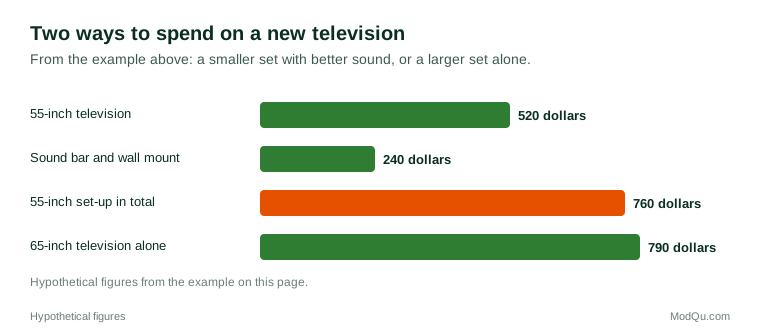
A couple replace an eight-year-old 43-inch set. A 55-inch 4K model costs 520 dollars and a 65-inch model of the same range costs 790 dollars. A sound bar adds 180 dollars and a wall mount 60 dollars. They choose the 55-inch television with the sound bar and mount for 760 dollars in total, rather than the 65-inch set alone, because the sound bar helps them hear dialogue.
Figure 1 compares the two set-ups in that example.
Extra costs that people sometimes forget include wall mounting and installation, extended warranties, cables, and subscriptions to streaming services that the new set makes easy to use.
How long people keep a television
Televisions are replaced less often than phones but more often than some large appliances. The main triggers for replacement are:
- the set breaks or develops a fault, such as lines on the screen or a failed power supply;
- the household moves to a new home or redecorates;
- the old set does not support newer apps or streaming services;
- a wish for a larger screen or better picture;
- a big sporting event or a seasonal sale.
When a household buys a new main television, the old one often moves to a bedroom or is given to a relative, so homes can end up with several sets of different ages.
Example
A family's main television still works after eleven years, but its built-in apps stopped receiving updates and the favourite streaming service no longer runs on it. Instead of replacing the set, they plug in a small streaming stick, which costs far less than a new television. They plan to replace the set only when it fails.
Where people buy and how they decide
People buy televisions from electronics shops, large general stores, online retailers and, in some places, local dealers who also install and repair them. Many look at sets in a shop to judge picture quality, then compare prices online. Reviews, advice from friends and the sales staff's recommendations all play a part.
Delivery, installation and disposal of the old set matter more for televisions than for small electronics. In some countries retailers must take back old electronics for recycling; in others, households have to find a collection point themselves.
Trends and debates
Several trends shape this topic:
- Larger screens: average screen sizes have grown as prices have fallen.
- Streaming: more viewing happens through apps, and some households have stopped paying for cable or satellite television.
- Software support: how long a smart television keeps receiving updates affects how long it stays useful.
- Data and privacy: some smart televisions collect information about what is watched. People differ in how much they know or mind about this.
- Energy use: large, bright screens use more electricity, and energy labels differ by country.
- Electronic waste: what happens to old televisions, and how easy they are to repair.
Questions that businesses want answered here include how old people's main televisions are, which features would make them upgrade, whether they use separate sound equipment, and how they choose where to buy.
Key terms
- ResolutionThe number of pixels that make up the picture, such as HD or 4K.
- 4KA resolution with about four times as many pixels as full HD.
- OLEDA screen type where each pixel makes its own light, allowing very deep blacks.
- HDRHigh dynamic range: a wider range between the brightest and darkest parts of the picture.
- Smart TVA television with built-in internet apps for streaming and other services.
- Sound barA long, thin speaker placed below or in front of a television to improve sound.
- HDMIThe standard cable connection for sending picture and sound between devices.
- Refresh rateHow many times per second the screen updates the picture, measured in hertz.
Full glossary: consumer electronics manufacturing terms on EditingTests.com.
Televisions and home entertainment systems vocabulary test
How well do you know the language of this topic? Try 8 quick questions. Your score is shown straight away and is not saved.
What the televisions and home entertainment systems survey asks
This survey is part of ModQu's Technology at Home survey. The televisions and home entertainment systems part takes about five minutes and covers:
- How many televisions your household has, and how old the main one is.
- How you watch: broadcast, cable or satellite, streaming apps, or games.
- Which features mattered most when you last chose a TV, and which would matter next time.
- Whether you use a sound bar, speakers or surround sound, and why.
- Where you bought your TV, what you paid, and how you decided.
- When you expect to replace your main television, and what would make you do it sooner.
After that you can choose to continue with other short parts of the Technology at Home survey, such as smartphones and mobile apps or internet and mobile plans, or stop.
Ready to take part?
Your answers help show what people really think and do. Results are only ever reported as totals; no one can see your individual answers.
Start the surveyQuestions about this survey
Who can take part?
Adults.
Do I have to give my name?
No. You may be asked for your age group, region and similar details so results can be broken down, but not your name. ModQu never asks for passwords, card numbers or account numbers.
How are the results used?
Answers are combined into totals and percentages and published in ModQu reports. Individual answers are never shown.
Is the vocabulary test part of the survey?
No. It is optional and separate, and your score is not stored.