
Share your experience of voice assistants
Tell us whether you use a voice assistant, what for, and whether you worry that it listens. Your answers are combined with other people's and reported only as totals.
Start the voice assistants surveyAbout 5 minutes. No account needed. You can stop at any time.
What this topic covers
A voice assistant is software that listens for spoken requests and responds by speaking, showing information on a screen or carrying out an action. It is usually started by a wake word, a word or phrase that tells the device to start listening, or by pressing a button.
Voice assistants are found in many places:
- Smartphones and tablets, where they are built into the operating system.
- Smart speakers and smart displays, which sit in a room and are controlled mainly by voice.
- Televisions and streaming devices, where voice is used to search for programmes.
- Cars, for navigation, calls and music while driving.
- Watches, earbuds and other wearables.
- Customer service phone lines, where an automated voice system answers calls.
This topic looks at who uses voice assistants, what for, how satisfied they are, and what concerns they have.
How voice assistants work
When a device hears its wake word, it starts recording what follows. On most devices the recording is sent over the internet to the provider's computers, which turn the speech into text, work out what the person wants, and send back an answer or carry out a task. Some simple requests can now be handled on the device itself without sending anything over the internet.
Voice assistants have to cope with different accents, languages, background noise and the many ways people phrase the same request. How well they do this varies, and speakers of some languages and accents find assistants less reliable than others. Many assistants support only a limited number of languages, which affects who can use them.
Newer assistants use large language models, a type of artificial intelligence that can hold longer conversations and answer more open questions. This is changing what people expect them to do.
What people use them for
Surveys of voice assistant users tend to find that a small number of simple tasks make up most use:
- playing music, radio or podcasts;
- asking about the weather;
- setting timers and alarms, especially while cooking;
- quick questions, such as facts, conversions or spelling;
- making calls and sending messages hands-free;
- getting directions while driving;
- controlling smart home devices such as lights, plugs and thermostats;
- adding items to a shopping list or calendar.
Fewer people use voice assistants to shop, book services or handle complicated tasks, often because they want to see options on a screen before deciding.
Example
A home cook keeps a smart speaker in the kitchen. They use it several times a day, but almost always for the same things: setting timers, converting cups to grams, playing the radio and adding items to the shopping list when they run out. They tried ordering groceries by voice once but stopped because they could not see what was being added.
Who uses them and who benefits most
Voice assistants are used by people of all ages, but some groups find them particularly helpful:
- People with visual impairments, who can use voice to read messages, make calls and get information.
- People with limited mobility or dexterity, who can control lights, doors and devices without moving.
- Older adults living alone, for reminders, calls and company, although some find set-up difficult.
- Drivers, who can keep their hands on the wheel.
- Parents with busy hands, such as when cooking or holding a child.
- People who find reading or typing hard, including those with low literacy in the language of the device.
Example
A man in his eighties with failing eyesight is given a smart display by his daughter. He uses it to call her with a spoken command, hear the news and get reminders to take his tablets. His daughter set it up and manages the settings from her phone. He says the hardest part was getting used to speaking to it in the right way.
Why people stop using them
Many people try a voice assistant and then use it less, or only for one or two tasks. The reasons they give include:
- the assistant often misunderstands them, especially with accents, names or mixed languages;
- it is quicker to do the task on a phone screen;
- they feel awkward talking to a device, especially in public;
- the assistant activates by mistake when it hears something like the wake word;
- they are worried about privacy;
- they do not know what else it can do.
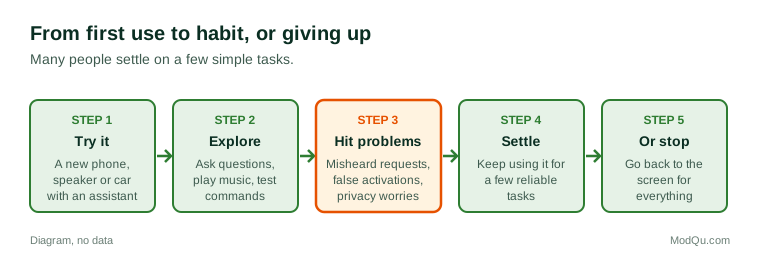
Figure 1 sets out the usual journey from first use to regular use or giving up.
Privacy and listening
Privacy is the most common concern people raise about voice assistants. Devices must listen for the wake word all the time, which leads many people to worry that they are recording everything. In general, devices listen locally for the wake word and only send recordings after it is heard, but false activations mean some unintended recordings are sent.
Other privacy questions include:
- whether recordings are stored, for how long, and whether people can delete them;
- whether staff or contractors ever listen to recordings to improve the service;
- how voice data is linked to other information the provider holds;
- who else in the household, including guests and children, is being recorded;
- whether recordings could be requested by police or courts.
Most devices offer settings to review and delete recordings, mute the microphone with a button, and turn off certain features. Data protection laws, such as those in the European Union and many other countries, give people rights over personal data, including voice recordings, though the details differ.
Example
A couple with a smart speaker in the living room notice that it lights up during a television programme when nobody has spoken to it. They open the app and find a short recording of the programme's dialogue. They set the app to delete recordings automatically after three months and start using the mute button when guests visit.
Voice assistants and customer service
Many people meet voice technology through automated phone systems rather than their own devices. When they call a bank, utility or airline, a voice system may ask them to say why they are calling. People's experience of these systems varies widely: some like getting a quick answer at any hour, while others find it frustrating to repeat themselves and want to speak to a person.
Survey research often asks how people feel about automated voice systems compared with human agents, how long they will try before asking for a person, and whether they would trust a voice system with sensitive tasks such as payments.
Trends and debates
Several trends are shaping voice assistants:
- More natural conversation, as assistants based on large language models can answer follow-up questions and handle complex requests.
- More languages and accents being supported, though gaps remain.
- Processing on the device, which can improve privacy and speed.
- Smart home standards that let devices from different makers work together.
- Voice in cars, where it is becoming the main way to control many features.
People disagree about whether voice assistants are genuinely useful or mainly a convenience for simple tasks, whether the privacy trade-off is acceptable, and whether children should use them. Questions that businesses want answered here include which tasks people use voice for, what would make them use it more, and how much they trust voice assistants with personal information.
Key terms
- Voice assistantSoftware that responds to spoken requests by speaking or carrying out actions.
- Wake wordA word or phrase that tells a device to start listening.
- Smart speakerA speaker with a built-in voice assistant, controlled mainly by voice.
- Smart displayA smart speaker with a screen.
- False activationWhen a device starts listening because it wrongly thinks it heard the wake word.
- Speech recognitionTechnology that turns spoken words into text.
- Smart homeLights, plugs, locks and other devices that can be controlled remotely or by voice.
- Interactive voice responseAn automated phone system that understands callers' spoken or keypad answers.
Full glossary: conversational ai terms on EditingTests.com.
Voice assistants vocabulary test
How well do you know the language of this topic? Try 8 quick questions. Your score is shown straight away and is not saved.
What the voice assistants survey asks
This survey is part of ModQu's Technology at Home survey. The voice assistants part takes about five minutes and covers:
- Whether you use a voice assistant, and on which devices.
- What you use it for, and how often.
- How well it understands you, including your accent and language.
- Whether you have stopped using one, and why.
- How concerned you are that it listens, and what privacy settings you use.
- How you feel about automated voice systems on customer service lines.
After that you can choose to continue with other short parts of the Technology at Home survey, such as smartphones and mobile apps or internet and mobile plans, or stop.
Ready to take part?
Your answers help show what people really think and do. Results are only ever reported as totals; no one can see your individual answers.
Start the surveyQuestions about this survey
Who can take part?
Adults.
Do I have to give my name?
No. You may be asked for your age group, region and similar details so results can be broken down, but not your name. ModQu never asks for passwords, card numbers or account numbers.
How are the results used?
Answers are combined into totals and percentages and published in ModQu reports. Individual answers are never shown.
Is the vocabulary test part of the survey?
No. It is optional and separate, and your score is not stored.