
Share your experience of your home office
Tell us what equipment you use at home, how often you print and what you bought last year. Your answers are combined with other people's and reported only as totals.
Start the printers, accessories and home office tech surveyAbout 5 minutes. No account needed. You can stop at any time.
What this topic covers
A home office is any space at home used for paid work, study, running a small business or managing household paperwork. For some people it is a separate room with a desk; for many it is a corner of a bedroom or the kitchen table. This topic covers the equipment people use there:
- Computers: laptops, desktop computers and tablets.
- Printers and scanners, including ink, toner and paper.
- Screens and input devices: monitors, keyboards, mice and docking stations.
- Video calling equipment: webcams, headsets, microphones and lighting.
- Furniture: desks, chairs, footrests and storage.
- Connectivity: routers, network extenders and backup power.
- Small accessories: cables, chargers, laptop stands, desk lamps and shredders.
It looks at what people own, what they bought recently, what they spend and what problems they have.
Who works and studies at home
The number of people working from home rose sharply in many countries in 2020 and has stayed higher than before, though the pattern varies a great deal by country, industry and type of job. People who use a home office include:
- employees who work from home some or all of the time;
- self-employed people and small business owners;
- students at school, college or university, including those studying online;
- people doing household administration, such as bills, tax forms and official letters;
- people with side jobs, such as online selling or tutoring.
Who pays for the equipment differs. Some employers provide laptops, monitors and chairs, or give an allowance; others expect staff to use their own. In some countries, people can claim certain home office costs against tax; rules vary and change over time.
Printers and how printing habits are changing
Many households still own a printer, but they print much less than they once did. Bills, tickets, boarding passes and forms have moved online, and documents can be signed digitally. People who still print often do so for:
- school homework and projects;
- official forms that must be printed and signed;
- return labels for online shopping;
- photographs;
- work documents they prefer to read on paper;
- small business needs such as invoices and labels.
The main types of printer are:
- Inkjet printers, which are cheap to buy and good for photos and colour, but ink can be expensive per page and may dry out if the printer is not used often.
- Laser printers, which use toner powder, cost more to buy, and are usually cheaper per page for text.
- All-in-one printers, which also scan and copy.
- Ink tank printers, which have refillable tanks instead of cartridges and cost more to buy but less per page.
- Photo printers, small devices for printing photographs only.
Example
A family prints only a few pages a month, mostly school worksheets and shipping labels. Each time they need to print, the inkjet printer's cartridges have dried out or show an error. They decide to stop printing at home and use a print shop near the school, and they keep the printer only for scanning.
The cost of ink and printing
The price of a printer is often low compared with the cost of ink or toner over its life. This is one of the most common complaints in this topic. Buyers compare:
- the price of the printer;
- the price of replacement cartridges or toner, and how many pages each one prints;
- whether cheaper compatible or refilled cartridges will work;
- whether an ink subscription, where cartridges are sent automatically based on use, would be cheaper;
- how much paper and electricity cost.
Example (hypothetical figures)
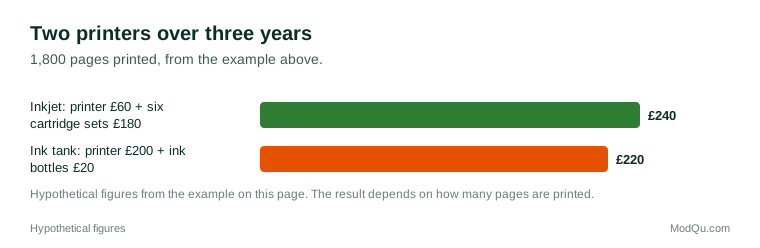
A student compares two printers over three years, printing 50 pages a month, which is 1,800 pages. An inkjet costs £60, with cartridges that cost £30 for about 300 pages, so it needs six sets, £180. An ink tank printer costs £200, and one set of ink bottles for £20 lasts for all 1,800 pages. The inkjet costs £240 over three years and the ink tank printer £220.
Figure 1 shows the comparison from the example. If the student printed less, the cheaper printer would have won.
Screens, keyboards and comfort
People who work at home for long hours often say that comfort became more important than they expected. A laptop on a kitchen table can lead to neck and back strain. Common purchases to improve this include:
- a separate monitor, or two, to make the screen larger and higher;
- a laptop stand so that the screen is at eye level;
- a separate keyboard and mouse;
- a desk chair with adjustable height and back support;
- a desk at the right height, or a desk that can be raised for standing;
- better lighting to reduce eye strain.
Health and safety bodies in many countries publish guidance on setting up a workstation, such as keeping the top of the screen at or slightly below eye level and keeping the feet flat. Some employers check home workstations or provide equipment on request.
Video calls and connectivity
Video calls are part of daily work and study for many people. The equipment they use includes:
- the laptop's built-in camera and microphone, which many people find adequate;
- a separate webcam for a clearer picture;
- a headset or earbuds with a microphone to reduce echo and background noise;
- a ring light or lamp to light the face;
- a plain background or a virtual background setting.
A reliable internet connection matters more than any other piece of equipment for many people. Common problems include weak Wi-Fi in some rooms, several people using the connection at once, and power cuts. People may buy network extenders, mesh Wi-Fi systems or mobile hotspots. In places with frequent power cuts, small backup batteries or uninterruptible power supplies keep a router and laptop running.
Example
A freelance designer working from a flat in a city with regular power cuts buys a small backup power unit for their router and laptop charger. During outages it keeps them online for about two hours, long enough to finish calls. They say it was the most useful home office purchase they made.
Spending, shopping and budgets
People buy home office equipment from electronics shops, office supply stores, general retailers and online marketplaces. Spending is often uneven: a large purchase when someone starts working from home or starts a course, followed by small replacements. Common questions people weigh include:
- whether to buy cheap equipment now or better equipment that lasts;
- whether their employer or school will pay;
- whether second-hand office furniture, often sold off by businesses, is a good option;
- whether they need a printer at all.
Trends and debates
Several trends and debates shape this topic:
- Less printing overall, but continued need for occasional printing.
- Ink pricing: complaints about expensive cartridges and printers that block cheaper cartridges, and the growth of ink tank printers and subscriptions.
- Hybrid work: people splitting time between home and an office need equipment in both places.
- Who pays: whether employers should cover home office costs.
- Health: concern about posture, eye strain and working long hours at home.
- Electronic waste: disposal of old printers, cartridges and accessories.
Questions that businesses want answered here include what equipment people own, how often they print, what they bought in the last year and what they plan to buy next.
Key terms
- Inkjet printerA printer that sprays tiny drops of liquid ink onto paper.
- Laser printerA printer that uses toner powder and heat, usually cheaper per page for text.
- Ink tank printerA printer with refillable ink tanks instead of cartridges.
- TonerThe fine powder used by laser printers and copiers instead of liquid ink.
- Cost per pageThe running cost of printing one page, mainly ink or toner.
- Compatible cartridgeA cartridge made by a different company to fit a particular printer.
- ErgonomicsDesigning a workspace so that it is comfortable and reduces strain.
- Docking stationA device that connects a laptop to monitors, keyboard and other equipment with one cable.
Full glossary: computer hardware manufacturing terms on EditingTests.com.
Printers, accessories and home office tech vocabulary test
How well do you know the language of this topic? Try 8 quick questions. Your score is shown straight away and is not saved.
What the printers, accessories and home office tech survey asks
This survey is part of ModQu's Technology at Home survey. The printers, accessories and home office tech part takes about five minutes and covers:
- Whether you work or study at home, and how often.
- Which home office equipment you own, including printers, monitors, chairs and webcams.
- Whether you own a printer, how often you print and what you print.
- What you spend on ink, toner and paper, and how you buy them.
- What home office equipment you bought in the last year, and who paid for it.
- What causes you the most problems in your home office set-up.
After that you can choose to continue with other short parts of the Technology at Home survey, such as smartphones and mobile apps or internet and mobile plans, or stop.
Ready to take part?
Your answers help show what people really think and do. Results are only ever reported as totals; no one can see your individual answers.
Start the surveyQuestions about this survey
Who can take part?
Adults who work or study at home.
Do I have to give my name?
No. You may be asked for your age group, region and similar details so results can be broken down, but not your name. ModQu never asks for passwords, card numbers or account numbers.
How are the results used?
Answers are combined into totals and percentages and published in ModQu reports. Individual answers are never shown.
Is the vocabulary test part of the survey?
No. It is optional and separate, and your score is not stored.