
Share your experience of gaming consoles
Tell us which console you own, what you have added to it and whether you plan to upgrade. Your answers are combined with other people's and reported only as totals.
Start the gaming consoles and accessories surveyAbout 5 minutes. No account needed. You can stop at any time.
What this topic covers
A games console is a computer built mainly to play video games, usually connected to a television or with its own screen. This topic covers the consoles people own, the accessories they buy for them, the services that come with them, and the choices players make about keeping, selling or replacing their machines.
It sits alongside other ways of playing. Many people also play on phones, tablets and personal computers, and some households use all of these. The console is often the shared machine in the living room, while phones and computers are more personal.
The main things this topic looks at are:
- Ownership: which kind of console a household has, how many, and who uses them.
- Accessories: controllers, headsets, storage, chargers, steering wheels and other add-ons.
- Games and services: physical discs, digital downloads and paid online subscriptions.
- Upgrades: how long people keep a console and what makes them buy a new one.
- Second-hand markets: buying used, trading in and reselling.
The main kinds of console
Consoles fall into a few broad groups, and the group shapes how a machine is used.
- Home consoles connect to a television and are designed to stay in one place. They are usually the most powerful and are often used by several people in a household.
- Handheld consoles have a built-in screen and controls, run on a battery and can be played anywhere.
- Hybrid consoles can be played as a handheld or placed in a dock to play on a television.
- Retro and mini consoles are small machines that come with older games already installed, often bought for nostalgia or as gifts.
- Cloud and streaming devices run games on remote servers and send the picture over the internet, so the device itself does less work.
Within each group, makers often sell more than one version: a standard model, a cheaper digital-only model with no disc drive, and sometimes a more powerful edition released partway through the console's life.
How people choose a console
Choosing a console is often a choice about games and friends as much as about hardware. The reasons people give tend to fall into a few groups:
- The games: some games are only available on one maker's machines, and a favourite series can decide the purchase.
- Friends and family: playing online with friends is easier when everyone is on the same system.
- Price: the price of the console itself, but also of games, subscriptions and extra controllers.
- Where it will be played: at home on a large television, on the move, or both.
- Who will play: young children, teenagers and adults may want different kinds of games and controls.
- What the household already has: owning games or accessories for one system makes it easier to stay with that maker.
Example
A parent is choosing a first console for two children aged seven and ten. The older child wants the one their classmates use so they can play together online. The parent cares more about parental controls, how many people can play on one screen and whether the console can be taken on a long car journey. They choose a hybrid console and set screen-time limits in its settings.
Accessories people buy
Accessories are a large part of what console owners spend, and often what they spend on first after the console itself. Common purchases include:
- Extra controllers, so that more people can play together, or to replace one that has worn out.
- Charging docks and rechargeable batteries for wireless controllers.
- Headsets with a microphone for talking to other players online.
- Storage: memory cards or external drives, because digital games take up a lot of space.
- Specialist controllers: steering wheels, flight sticks, arcade sticks and adaptive controllers designed for players with disabilities.
- Cases, screen protectors and grips for handheld and hybrid consoles.
- Stands, cooling fans and cables for home consoles.
Accessories may be made by the console maker or by other companies. Players weigh price against quality, and against whether a cheaper controller will work properly with every game.
What owning a console really costs
The price on the box is only part of the cost of owning a console. Over several years, games, online subscriptions and accessories can add up to much more than the console itself.
Example (hypothetical figures)
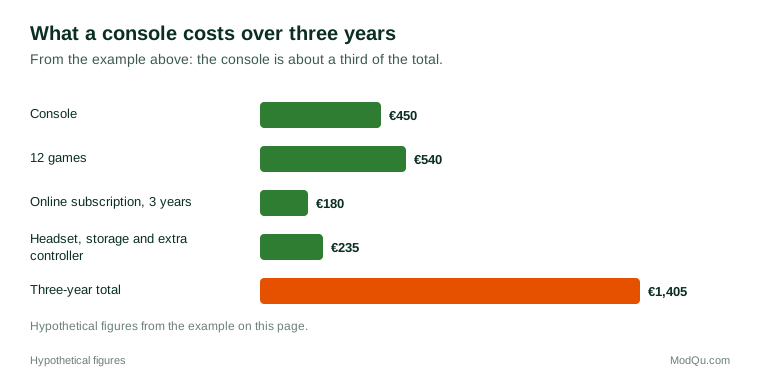
A player buys a console for €450 and an extra controller for €65. Over three years they buy 12 games at an average of €45, which is €540, and pay €60 a year for an online subscription, which is €180. Adding a headset (€80) and a storage drive (€90), the three-year total comes to €1,405. The console itself was about a third of that.
Figure 1 shows how the costs in that example break down.
Some people see consoles as good value because one machine entertains a household for years. Others point to ongoing spending on games and subscriptions, which is easy to underestimate because it is spread out.
Physical games, digital games and subscriptions
Console games can be bought in several ways, and each has trade-offs:
- Physical discs or cartridges can be lent, resold or traded in, and do not take up as much storage. They need a console with a disc drive or cartridge slot.
- Digital downloads are bought from the console's online store. They cannot usually be resold, but they are convenient and often discounted in sales.
- Game subscriptions give access to a rotating library of games for a monthly or yearly fee. They can be good value for people who play many different games, and less so for people who play one game for a long time.
- Free-to-play games cost nothing to download but sell optional extras inside the game.
Many players mix these: they buy favourite games outright, try others through a subscription, and play one or two free-to-play games with friends.
When and why people upgrade
Console makers release a new generation every several years. People do not all upgrade at once. Some buy on launch day; many wait until prices fall, more games are available and early problems have been fixed; some keep an older console for years and never upgrade.
Common reasons for upgrading include:
- a game the player wants is only available on the new console;
- friends have moved to the new system;
- the old console has broken, become noisy or run out of storage;
- better picture quality on a new television;
- a good trade-in offer or a bundle deal.
Common reasons for waiting include price, a small number of new games, and being happy with the games already owned. Whether new consoles can play older games, called backward compatibility, often affects how willing people are to switch.
Example
A student keeps their older home console for two years after the new generation comes out. They upgrade only when a used new-generation console appears for sale at a good price from a friend who is moving abroad. They sell the old console with its games to a local second-hand shop and use the money towards two new games.
Second-hand, refurbished and trade-ins
Many consoles, games and accessories are bought and sold second-hand. Buyers save money, and sellers recover part of what they paid. Options include second-hand shops, online marketplaces, trade-in schemes at retailers, and refurbished consoles that have been checked and repaired by a seller or the maker.
Buyers of used consoles worry about faults, missing parts, accounts still linked to the old owner, and consoles that have been banned from online services. Refurbished products usually come with a short warranty, which is part of why people pay more for them than for private sales.
Concerns and debates
Console gaming raises several questions that players, parents and makers disagree about:
- Screen time and children: how much play is reasonable, and how well parental controls work.
- In-game purchases: whether paid extras and random reward boxes encourage overspending, especially by young players. Some countries regulate these more strictly than others.
- Ownership of digital games: whether a digital game is really owned if it cannot be resold or may become unavailable.
- Repair and durability: how easy it is to repair consoles and controllers, and how long they should last.
- Accessibility: how well consoles and games support players with disabilities.
- Environmental impact: energy use, packaging and electronic waste when consoles are replaced.
Questions that businesses want answered here include which accessories players buy and why, how long people keep a console, what would make them upgrade, and how they feel about subscriptions compared with buying games outright.
Key terms
- Console generationA group of consoles released by makers at around the same time, replacing the previous group.
- Handheld consoleA games console with a built-in screen and controls that runs on a battery.
- Hybrid consoleA console that can be played as a handheld or connected to a television in a dock.
- Backward compatibilityThe ability of a new console to play games made for an older one.
- Digital-only consoleA console model with no disc drive, so all games must be downloaded.
- Game subscriptionA monthly or yearly fee for access to a library of games or online features.
- In-game purchaseAn optional item, upgrade or currency bought inside a game with real money.
- Adaptive controllerA controller designed so players with limited movement can customize how they play.
Full glossary: gaming terms on EditingTests.com.
Gaming consoles and accessories vocabulary test
How well do you know the language of this topic? Try 8 quick questions. Your score is shown straight away and is not saved.
What the gaming consoles and accessories survey asks
This survey is part of ModQu's Technology at Home survey. The gaming consoles and accessories part takes about five minutes and covers:
- Whether you own a games console, which kind, and who in your household uses it.
- Which accessories you have bought, and where you bought them.
- How you buy games: physical copies, downloads, subscriptions or free-to-play.
- How much you spend on gaming in a typical month.
- How old your console is, and whether you plan to buy a new one.
- Whether you have bought, sold or traded in a used console or games.
After that you can choose to continue with other short parts of the Technology at Home survey, such as smartphones and mobile apps or internet and mobile plans, or stop.
Ready to take part?
Your answers help show what people really think and do. Results are only ever reported as totals; no one can see your individual answers.
Start the surveyQuestions about this survey
Who can take part?
Adults who play video games.
Do I have to give my name?
No. You may be asked for your age group, region and similar details so results can be broken down, but not your name. ModQu never asks for passwords, card numbers or account numbers.
How are the results used?
Answers are combined into totals and percentages and published in ModQu reports. Individual answers are never shown.
Is the vocabulary test part of the survey?
No. It is optional and separate, and your score is not stored.