
Share your experience of repairing and buying second-hand
Tell us whether you repair your devices, buy refurbished, and what you think about spare parts. Your answers are combined with other people's and reported only as totals.
Start the tech repair and second-hand devices surveyAbout 5 minutes. No account needed. You can stop at any time.
What this topic covers
This topic covers what happens to phones, tablets, laptops and other electronics after they are first bought:
- Repair: by the maker, an authorized repair shop, an independent shop, or the owner.
- Refurbished devices: used or returned devices checked, repaired and resold, often with a warranty.
- Used devices: bought directly from another person or through a marketplace.
- Trade-ins and resale: getting money or credit for an old device.
- Recycling and disposal when a device has no further use.
- Right to repair: laws and policies about access to parts, tools and repair information.
Common repairs
The repairs people need most often are fairly predictable:
- Cracked screens on phones and tablets.
- Worn batteries that no longer last a day.
- Charging ports that stop working because of wear or lint.
- Water damage.
- Laptop keyboards, hinges and screens.
- Slow performance, which may be solved by a storage upgrade, more memory, or a fresh software install.
Whether a repair makes sense depends on the age of the device, the cost of the repair compared with a replacement, and how much the owner likes the device.
Example (hypothetical figures)
A phone worth about $300 on the used market has a cracked screen. The maker's service centre quotes $280 for a new screen, an independent shop quotes $160 with a non-original part, and a new phone costs $900. The owner chooses the independent shop and keeps using the phone for another two years.
Where people get devices repaired
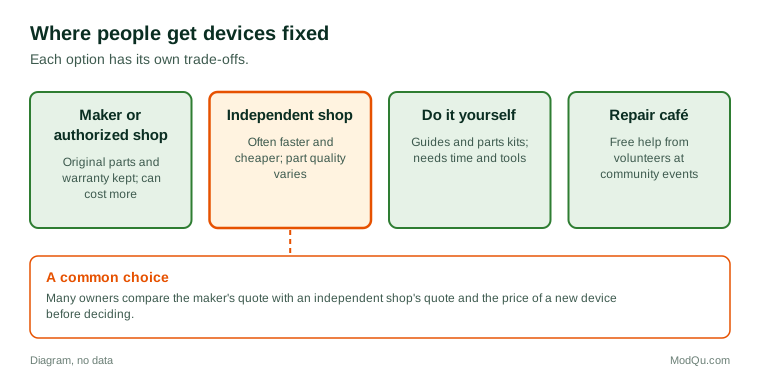
Each option has trade-offs:
- The maker or an authorized provider uses original parts and keeps the warranty intact, but can cost more and may involve mailing the device away.
- Independent repair shops are often faster and cheaper, but quality varies, and some parts may not be original.
- Carrier and retail store services may offer repairs or replacements through a protection plan.
- Do-it-yourself repair using online guides and parts kits suits people with patience and the right tools. Some makers now sell parts and tools directly to consumers.
- Repair cafés, community events where volunteers help people fix items for free, are found in many Canadian cities.
Example
A retiree's laptop hinge breaks. The maker's service centre says the whole screen assembly must be replaced. A volunteer at a local repair café shows them how to order the hinge part alone and helps them fit it in half an hour.
Refurbished and used devices
Refurbished devices have become a mainstream choice. They are usually cheaper than new, often come with a warranty, and keep devices in use for longer. Sellers often grade refurbished devices by condition, such as "excellent", "good" or "fair", but grades are not standard from one seller to another.
Things buyers check include:
- battery health, which affects how long the device will last between charges;
- how long it will keep receiving software and security updates;
- whether it is unlocked and not reported lost or stolen;
- the warranty and return policy;
- cosmetic condition, such as scratches.
Buying used directly from a person is usually cheaper still but carries more risk: no warranty, a chance the device is locked to someone else's account, and the possibility of a scam.
Example
A buyer finds a used tablet on an online marketplace and meets the seller in the lobby of a police station, as some police services suggest. Before paying, they turn it on, check that it is signed out of the previous owner's account and reset to factory settings, and test the charging port.
Selling, trading in and passing on
When people replace a device, the old one may be:
- traded in to a carrier or retailer for credit;
- sold privately;
- given to a family member;
- donated to a charity or school program;
- kept in a drawer "just in case";
- recycled.
Many households have several old phones in a drawer. Reasons include worry about personal data, not knowing the device's value, keeping a spare, or simply not getting around to it. Before passing on any device, owners are usually advised to back up their data, sign out of their accounts, and reset it to factory settings.
The right to repair
Right to repair is the idea that owners and independent shops should be able to fix devices without needing the original maker. Supporters want:
- parts, tools and repair manuals available at fair prices;
- devices designed so batteries and screens can be replaced;
- no software locks that stop third-party parts from working;
- longer periods of software support.
Makers have raised concerns about safety, security and quality. Some jurisdictions have passed right to repair laws, including several American states and the European Union. In Canada, the federal government amended copyright law in 2024 to allow people to get around digital locks for the purpose of repair and maintenance, and Quebec has passed a law on planned obsolescence and repairability. Opinion polls in many countries suggest broad public support for the idea, though people may not use the rights they support.
Recycling and e-waste
Electronic waste contains valuable metals as well as materials that can harm the environment if thrown in regular garbage. Provinces run collection programs at depots and stores. Some people are unsure whether devices sent for recycling are reused, taken apart for materials, or shipped elsewhere. Reuse is generally seen as better than recycling, because a device that keeps working for another owner avoids the materials and energy needed to make a new one. That is one reason refurbishing programs and donation drives for schools and charities have grown.
What people disagree about
Opinion is divided on whether makers should have to sell spare parts, whether non-original parts are safe, whether refurbished devices are as good as new, and how long a phone or laptop should be expected to last. These attitudes are useful to makers, retailers and policymakers, and can shift as laws and prices change.
Key terms
- RefurbishedA used or returned device checked, repaired and resold, usually with a warranty.
- Right to repairThe idea that owners and independent shops should be able to fix devices.
- Authorized repairRepair by the maker or a shop it has approved.
- Battery healthA measure of how much charge a battery can still hold compared with new.
- Factory resetErasing a device and returning it to its original settings.
- E-wasteDiscarded electronic devices.
- Planned obsolescenceDesigning a product to stop working or become outdated early.
- Activation lockA security feature that stops a device being used without the owner's account.
Full glossary: consumer electronics repair terms on EditingTests.com.
Tech repair and second-hand devices vocabulary test
How well do you know the language of this topic? Try 8 quick questions. Your score is shown straight away and is not saved.
What the tech repair and second-hand devices survey asks
This survey is part of ModQu's Technology at Home survey. The tech repair and second-hand devices part takes about five minutes and covers:
- Whether you have had a phone, tablet or laptop repaired, where, and what it cost.
- Whether you have repaired a device yourself.
- Whether you have bought a refurbished or used device, or would.
- What you did with your last old device.
- How many old devices you have at home that you no longer use.
- Whether makers should have to sell spare parts and repair information.
After that you can choose to continue with other short parts of the Technology at Home survey, such as smartphones and mobile apps or internet and mobile plans, or stop.
Ready to take part?
Your answers help show what people really think and do. Results are only ever reported as totals; no one can see your individual answers.
Start the surveyQuestions about this survey
Who can take part?
Device owners.
Do I have to give my name?
No. You may be asked for your age group, region and similar details so results can be broken down, but not your name. ModQu never asks for passwords, card numbers or account numbers.
How are the results used?
Answers are combined into totals and percentages and published in ModQu reports. Individual answers are never shown.
Is the vocabulary test part of the survey?
No. It is optional and separate, and your score is not stored.
Does the survey cover other electronics?
It focuses on phones, tablets and computers, with a few questions about other household electronics.