
Share your experience of passwords and digital ID
Tell us how you keep track of passwords, how you sign in and whether you would use a digital ID. Your answers are combined with other people's and reported only as totals.
Start the passwords and digital identity surveyAbout 5 minutes. No account needed. You can stop at any time.
What this topic covers
Every online account needs a way to check that the person signing in is the account's owner. For most of the internet's history that meant a username and a password. Today people use a wider mix of methods, and many countries are also building digital identity systems that let people prove who they are to governments, banks and other organizations.
This topic covers two connected areas:
- Signing in: passwords, password managers, two-step verification, passkeys, fingerprint and face recognition, and signing in with an existing account.
- Digital identity: proving who you are online, for example when opening a bank account, filing taxes, claiming benefits or checking your age, using a digital ID app, an electronic identity card or an online identity check.
Both areas raise the same questions: how convenient is it, how safe is it, and who can be trusted with personal information?
How people keep track of passwords
People with many accounts have to remember or store many passwords. The methods they use include:
- Memory: keeping a few passwords in their head, often by reusing the same one or small variations of it.
- Paper: a notebook or a list kept at home.
- Saving in the browser or phone: letting the device remember passwords.
- Password managers: apps that store passwords in an encrypted vault, protected by one main password, and fill them in automatically.
- Resetting: not remembering at all, and using "forgot password" each time.
Reusing passwords is common because it is easy, but it is risky. When one website suffers a data breach and its passwords are stolen, criminals try the same email and password combinations on other sites. This is called credential stuffing.
Example
A shop worker uses the same password, with a different number at the end, for email, social media and an online shop. After the shop announces a data breach, someone signs in to their email from another country. They reset all their passwords, start using the password manager built into their phone and switch on two-step verification for email.
What makes a password stronger
Security guidance has changed over time. Older advice asked for short passwords with a mix of capital letters, numbers and symbols, changed every few months. Many security bodies now give simpler advice:
- longer passwords are generally stronger than short complicated ones;
- a passphrase of several unrelated words can be long and still memorable;
- each important account should have its own password;
- passwords do not need to be changed on a schedule, only when there is a reason, such as a breach;
- the email account matters most, because it can be used to reset other passwords.
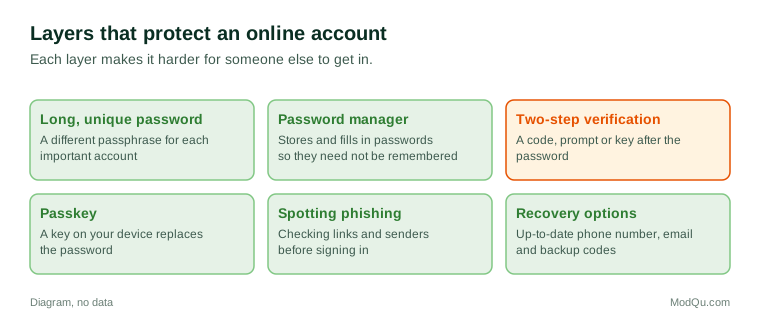
Figure 1 shows the main layers people use to protect their accounts.
Two-step verification
Two-step verification, also called two-factor or multi-factor authentication, asks for a second proof after the password. Common second steps are:
- a code sent by text message;
- a code from an authenticator app that changes every 30 seconds or so;
- a prompt on a phone that the person approves;
- a physical security key that plugs in or is tapped against the phone;
- a fingerprint or face scan on a trusted device.
Two-step verification makes it much harder for someone who has stolen a password to get in. Many banks and governments now require it. People sometimes find it inconvenient, worry about losing access if they lose their phone, or are not sure how to set it up.
Text-message codes are widely used but are considered less secure than app codes or security keys, because criminals can sometimes take over a phone number by persuading a mobile operator to move it to a new SIM card.
Passkeys and signing in without passwords
A newer method, the passkey, replaces the password with a pair of digital keys. One key stays on the person's device and the other is stored by the website. To sign in, the person unlocks their phone or computer with a fingerprint, face scan or PIN. Because there is no password to type, there is nothing for a fake website to steal.
Passkeys are being adopted by many large services, but people are still learning how they work. Common questions include what happens if the phone is lost, whether passkeys work across different devices, and whether the website can see the fingerprint (it cannot; the fingerprint stays on the device).
Another common method is signing in with an existing account, such as an email or social media account, instead of creating a new password. It is convenient, but it ties many services to one account.
Digital identity schemes around the world
Digital identity means being able to prove who you are online, much as a passport or identity card does in person. Countries have taken different approaches:
- National electronic identity cards with a chip that can be read by a phone or card reader, used in a number of European countries.
- National digital ID numbers linked to biometrics, such as India's Aadhaar, used for government services, banking and mobile phone registration.
- Government sign-in services that let one account be used across many public services, used in countries such as Canada, Australia and the United Kingdom.
- Bank-based identity, where people use their online bank sign-in to prove who they are to other organizations, as in several Nordic countries.
- Digital wallets on phones that hold an electronic version of a driving licence or identity card, being introduced in parts of the United States, the European Union and elsewhere.
How widely these are used, and whether they are required, differs a great deal between countries.
Example
A person who has moved to a new country needs to open a bank account, register with a doctor and sign up for a phone plan. Each asks for proof of identity. In their home country one national digital ID did all of this; in the new country they must show a passport in person several times until they can register for the government's online sign-in service.
What people worry about
People's attitudes to passwords and digital identity are shaped by both convenience and concern. Common worries include:
- Fraud and account takeover: losing money or having accounts misused.
- Phishing: fake emails, texts and websites that trick people into entering their details.
- Privacy: how much personal information is collected, who can see it and how long it is kept.
- Government use: whether a digital ID could be used to track people, and whether it is required for basic services.
- Exclusion: people without smartphones, internet access or documents finding it harder to use services.
- Losing access: being locked out of accounts after losing a phone or forgetting a main password.
Example
An older adult is asked by their bank to set up app-based approval for online payments. They do not have a smartphone and worry that they will no longer be able to bank online. The bank offers a small card reader that generates codes instead, and they visit a branch to have it set up.
Trends and debates
Trends in this area include the slow move away from passwords towards passkeys and biometrics, wider use of two-step verification, and more countries introducing digital ID wallets. Debates continue about how to balance security with convenience, how much control people should have over their identity data, and how to make sure those without smartphones are not left behind.
Questions that businesses want answered here include how people manage passwords today, which sign-in methods they trust, whether they would use a digital ID app, and what would make them more willing to switch to passkeys.
Key terms
- Password managerAn app that stores passwords in an encrypted vault and fills them in for you.
- Two-step verificationA second check after the password, such as a code or a prompt on a phone.
- PasskeyA sign-in method that uses a digital key on your device instead of a password.
- BiometricsBody features used to confirm identity, such as a fingerprint or face.
- PhishingA fake message or website designed to trick people into giving their details.
- Credential stuffingTrying stolen usernames and passwords from one site on other sites.
- Data breachAn incident in which personal information is stolen or exposed.
- Digital IDAn electronic way of proving who you are, issued or recognized by a trusted body.
Full glossary: digital identity platforms terms on EditingTests.com.
Passwords and digital identity vocabulary test
How well do you know the language of this topic? Try 8 quick questions. Your score is shown straight away and is not saved.
What the passwords and digital identity survey asks
This survey is part of ModQu's Technology at Home survey. The passwords and digital identity part takes about five minutes and covers:
- How many online accounts you have, and how you keep track of their passwords.
- Whether you reuse passwords, and whether you use a password manager.
- Whether you use two-step verification, and which method.
- Whether you have used passkeys, fingerprint or face sign-in, and how you feel about them.
- Whether you have a digital ID or government sign-in account, or would use one.
- Your experience of hacked accounts, phishing or identity fraud, if any.
After that you can choose to continue with other short parts of the Technology at Home survey, such as smartphones and mobile apps or internet and mobile plans, or stop.
Ready to take part?
Your answers help show what people really think and do. Results are only ever reported as totals; no one can see your individual answers.
Start the surveyQuestions about this survey
Who can take part?
Adults who use the internet.
Do I have to give my name?
No. You may be asked for your age group, region and similar details so results can be broken down, but not your name. ModQu never asks for passwords, card numbers or account numbers.
How are the results used?
Answers are combined into totals and percentages and published in ModQu reports. Individual answers are never shown.
Is the vocabulary test part of the survey?
No. It is optional and separate, and your score is not stored.