
Share your experience of learning technology
Tell us which learning apps and devices your household uses and whether they help. Your answers are combined with other people's and reported only as totals.
Start the education technology surveyAbout 5 minutes. No account needed. You can stop at any time.
What education technology covers
Education technology, often shortened to edtech, means any digital tool used to support teaching and learning. It includes:
- Devices: laptops, tablets, interactive whiteboards and, in some schools, phones.
- Learning management systems: platforms where teachers post work, students submit it and marks are recorded.
- Learning apps and websites for reading, mathematics, languages, science and test practice.
- Video lessons and online courses.
- Communication tools for messages between schools and families.
- Assistive technology, such as text-to-speech, screen readers and speech-to-text, for students with disabilities or learning difficulties.
- Adaptive software that changes the difficulty of questions based on a student's answers.
- AI tools that answer questions, give feedback or help write.
Use varies greatly. Some schools give every student a device; others have a few shared computers or none. Access at home also varies with household income, internet coverage and the number of devices shared among family members.
How schools use technology
Schools use technology for teaching, for organization and for communication. Teachers may show videos, use quizzes that give instant results, set homework online and track progress through a platform. Administrators use systems for attendance, timetables and reports. Parents may receive messages, pay for trips and see grades through an app.
Example
A secondary school gives each student a tablet. Homework is posted on the school's platform, and students submit photos of written work. Parents get a weekly email listing missing assignments. A teacher says marking is faster, but some students without home internet have to stay late in the library to finish homework.
Learning at home
Outside school, families use apps for reading practice, mathematics games, language learning, coding and exam preparation. Some are free; others charge a subscription. Younger children often use tablets with learning games, while older students use video lessons and practice tests.
Home learning technology became much more widely used during the school closures of the COVID-19 pandemic, when many schools moved to remote teaching. That period showed both what technology could do and how unequal access was. Many children shared one phone with siblings or had no reliable internet connection.
Example
A parent working evening shifts installs a reading app for their seven-year-old. The child reads short stories aloud and the app records progress. The parent checks the weekly report on their phone. The app is free for basic use but charges a monthly fee for extra stories, which the family decides not to pay.
What technology helps with
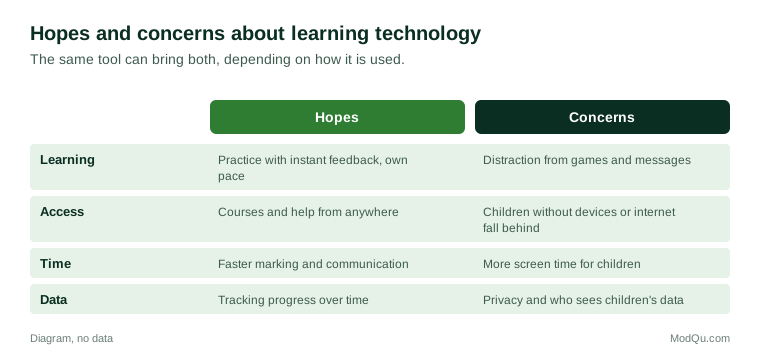
Teachers, students and parents describe several benefits:
- practice with instant feedback, especially for mathematics and spelling;
- learning at a student's own pace;
- access to subjects or courses a local school does not offer;
- support for students with disabilities through assistive tools;
- easier communication between school and home;
- skills in using computers and finding information.
Research shows mixed results. Technology tends to help most when it is used for a clear purpose, supports good teaching rather than replacing it, and is matched to what students are learning. Simply providing devices does not, on its own, raise results.
Concerns
Common concerns include:
- Screen time: worry about how many hours children spend on screens, especially young children.
- Distraction: games, messages and social media competing with schoolwork.
- The digital divide: children without devices or internet fall further behind.
- Privacy: how much data apps collect about children and who can see it.
- Cost: subscriptions, device repairs and replacement.
- Teacher workload: learning and managing many different platforms.
- Phones in school: several countries and many schools have restricted or banned phones during the school day, while others allow them for learning.
UNESCO's 2023 Global Education Monitoring Report focused on technology in education and argued that its use should be judged on whether it helps learning, with attention to equity and children's wellbeing.
Example (hypothetical figures)
A household with three school-age children has one laptop and two phones. During a week of homework, the children need a total of 15 hours of device time, but the laptop is free for only 9 hours after the parents' own use. The oldest child does the remaining work on a phone, which they find slow for writing essays.
Choosing apps and devices
Families choosing learning technology look at price, whether the school recommends it, reviews from other parents, the child's age, whether it has adverts or in-app purchases, privacy settings and whether the child actually enjoys it. Schools choosing platforms consider cost, ease of use, how well tools fit together and data protection rules.
What people disagree about
People disagree on how much technology children should use, at what age, and whether schools should give every student a device. Some see technology as essential preparation for modern work. Others worry it reduces reading, handwriting and attention. Views on artificial intelligence tools in schoolwork are especially divided.
Questions that schools, ed tech firms and education departments want answered include which apps families use, whether children use devices at school, how much they spend, and whether parents and teachers think technology helps learning.
Technology for students with additional needs
For some students, technology makes a large difference. Text-to-speech software reads text aloud for students with dyslexia or visual impairments. Speech-to-text lets students who find handwriting difficult dictate their work. Screen magnifiers, captions on videos and communication apps help students with hearing, sight or speech difficulties. These tools are often provided through schools or health services, but families sometimes buy them themselves, and access varies widely between countries and schools.
Key terms
- EdtechShort for education technology: digital tools used for teaching and learning.
- Learning management systemA platform where teachers set work and students submit it.
- Adaptive learningSoftware that changes difficulty based on a student's answers.
- Assistive technologyTools that help people with disabilities learn or communicate.
- Digital divideThe gap between people with and without good access to technology.
- Remote learningTeaching and learning that happen online instead of in a classroom.
- Screen timeTime spent using devices with screens.
- In-app purchasePaying for extra content or features inside an app.
Full glossary: educational technology terms on EditingTests.com.
Education technology vocabulary test
How well do you know the language of this topic? Try 8 quick questions. Your score is shown straight away and is not saved.
What the education technology survey asks
This survey is part of ModQu's Education and Learning survey. The education technology part takes about five minutes and covers:
- Which learning apps, websites and devices your household uses.
- Whether your child uses a device at school, and whose device it is.
- How much time children spend learning on screens.
- What you pay for learning apps or subscriptions.
- Whether you think technology helps learning, and your main concerns.
- How well your household's devices and internet meet school needs.
After that you can choose to continue with other short parts of the Education and Learning survey, such as choosing a college or university or online learning, or stop.
Ready to take part?
Your answers help show what people really think and do. Results are only ever reported as totals; no one can see your individual answers.
Start the surveyQuestions about this survey
Who can take part?
Students, parents and teachers.
Do I have to give my name?
No. You may be asked for your age group, region and similar details so results can be broken down, but not your name. ModQu never asks for passwords, card numbers or account numbers.
How are the results used?
Answers are combined into totals and percentages and published in ModQu reports. Individual answers are never shown.
Is the vocabulary test part of the survey?
No. It is optional and separate, and your score is not stored.
How much screen time is too much for learning?
There is no single answer. Health and education bodies in different countries give different guidance by age, and many focus on what children do on screens as well as how long.
Can teachers answer this survey?
Yes. The survey has questions for students, parents and teachers, and you can say which applies to you.
Does the survey name specific apps?
It may ask you to type the apps you use. Results are reported by type of app, not to promote any product.
Is gaming counted as learning?
Only if it is a game designed for learning. The survey separates learning use from general screen time.