
Share how you search
Tell us how often you search the web, whether you trust the first results and whether you have tried a different search engine. Your answers are combined with other people's and reported only as totals.
Start the search engines surveyAbout 5 minutes. No account needed. You can stop at any time.
What a search engine does
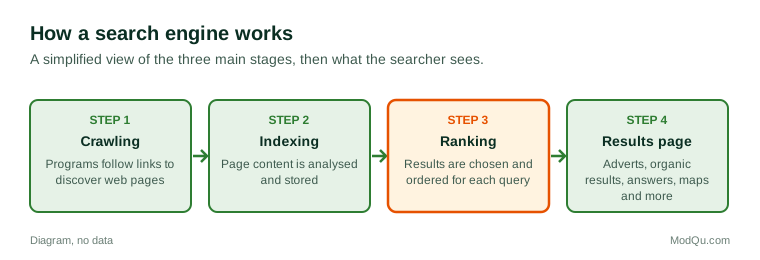
A search engine is a service that helps people find information on the web. In general terms it works in three stages:
- Crawling: automated programs visit web pages and follow links to discover content.
- Indexing: the content of pages is analysed and stored in a large database.
- Ranking: when someone types a query, the engine chooses and orders the results it judges most relevant and useful, using many signals about the page, the query and sometimes the user's location and language.
Search engines are offered by large technology companies and by smaller providers, and some countries have popular local search engines. Search is also built into browsers, phones, smart speakers, maps, shopping sites and social media apps.
How people search
People search for many reasons:
- Facts and answers: definitions, dates, conversions, weather.
- Navigation: typing a website's name to reach it rather than its address.
- Local information: shops, opening hours and directions.
- How-to help: recipes, repairs and instructions.
- Products and prices: comparisons and reviews before buying.
- News and events.
- Health, legal and money questions, where the quality of information matters most.
Queries range from single words to full questions. Voice search on phones and smart speakers has made longer, spoken questions more common. Many people search on a phone more than on a computer.
Example
A person whose washing machine shows an error code types the code and the machine type into a search engine. The first result is an advert for a repair service; the second is a forum thread; the fourth is the maker's support page, which explains the code. They follow the maker's instructions to clean a filter and fix the problem.
Reading the results page
A typical results page may include:
- Adverts (sponsored results), usually labelled.
- Organic results, the ordinary ranked list of web pages.
- Direct answers and summaries shown at the top of the page.
- Maps and local listings.
- Images, videos and news.
- Shopping listings with prices.
- "People also ask" style related questions.
Studies of search behaviour have long found that people click mostly on results near the top of the first page and rarely go to later pages. Many searches now end without a click at all, because the answer is shown on the results page.
Example (hypothetical figures)
A person counts their searches for one day: 24 in total. Of these, 9 were answered on the results page without a click, 11 led to a click on one of the top three results, 3 led to a click further down the first page and 1 led to a second page of results. So 20 of 24 searches (about 83%) ended on the results page or in the top three results.
Trust in results
People differ in how far they trust search results. Some assume the top results are the most reliable; others check several sources. Points that affect trust include:
- whether people can tell adverts from organic results;
- whether the source is well known, official or expert;
- whether results agree with each other;
- whether the topic is one where false or misleading information is common, such as health or politics;
- awareness that sites can try to improve their ranking through search engine optimisation, which can push some pages up regardless of quality.
Researchers who study information literacy recommend checking who is behind a page, when it was written and whether other reliable sources agree, especially for important decisions.
Searching for health, money and legal information
Searches about health, money and the law are among the most important people make, because the results can affect decisions about treatment, savings or legal rights. Search engines in many countries show information panels from recognised health bodies for common conditions, and some highlight official sources for topics such as elections or emergencies. Even so, people may find forums, adverts and commercial sites mixed with expert sources. Health and consumer bodies generally advise checking that information comes from a recognised organisation, is recent and applies to the reader's country, since rules and services differ.
Personalisation and privacy
Search results can be shaped by location, language, past searches and other signals. This makes results more relevant for local searches but also raises questions about filter bubbles, where people see results that match their existing views, though researchers disagree about how strong this effect is in search.
Search engines may collect data about queries, location and devices. People who are concerned about privacy can use privacy settings, private browsing modes, or search engines that promise not to track users. Data protection laws in some regions give people rights to see and delete data held about them.
AI answers in search
Many search services now show answers written by artificial intelligence at the top of the results page, summarising information from several sources. People find these convenient but differ in how much they trust them, since such summaries can contain errors. Some people check the linked sources; others take the summary as the answer. This is a fast-changing area, and how it affects searching habits is still being studied.
Example
A student asks a search engine a question about a historical event. The AI summary at the top gives a date that differs from the date in their textbook. They open two of the cited sources and a library database and find the textbook is correct, so they note to check AI summaries against sources.
Alternatives and switching
Most people use the search engine that comes as the default on their phone or browser, and few switch. Reasons some people do switch include privacy, dissatisfaction with adverts or result quality, support for a local or independent provider, or features such as built-in AI chat. Many people also search directly inside other services: video platforms, social media, online shops, maps and AI chat tools. Competition authorities in several regions have examined how default settings affect choice of search engine.
Key terms
- Search engineA service that finds and ranks web pages in response to a query.
- QueryThe words or question typed or spoken into a search engine.
- CrawlingAutomated discovery of web pages by following links.
- IndexingAnalysing and storing page content so it can be searched.
- Organic resultA result ranked by the search engine rather than paid for.
- Sponsored resultA paid advert shown among search results.
- Search engine optimisationWork to make web pages rank higher in search results.
- Filter bubbleA situation where personalisation shows people mainly information that matches their views.
Full glossary: search engine platforms terms on EditingTests.com.
Search engines vocabulary test
How well do you know the language of this topic? Try 8 quick questions. Your score is shown straight away and is not saved.
What the search engines survey asks
This survey is part of ModQu's Digital Life and the Internet survey. The search engines part takes about five minutes and covers:
- How often you search the web each day, and on which devices.
- What you search for most.
- Whether you trust the first results, and how you check information.
- Whether you can tell adverts from other results.
- Whether you have tried a different search engine, and why.
- Whether you use AI answers or search inside other apps instead.
After that you can choose to continue with other short parts of the Digital Life and the Internet survey, such as internet use habits or email, or stop.
Ready to take part?
Your answers help show what people really think and do. Results are only ever reported as totals; no one can see your individual answers.
Start the surveyQuestions about this survey
Who can take part?
Adults who use the internet.
Do I have to give my name?
No. You may be asked for your age group, region and similar details so results can be broken down, but not your name. ModQu never asks for passwords, card numbers or account numbers.
How are the results used?
Answers are combined into totals and percentages and published in ModQu reports. Individual answers are never shown.
Is the vocabulary test part of the survey?
No. It is optional and separate, and your score is not stored.
Are search results the same for everyone?
Not always. Results can differ by location, language, device and past activity.
Can I stop a search engine tracking my searches?
Many search engines offer privacy settings and ways to delete history, and some say they do not track users. What is collected depends on the service and local law.