
Share how you judge websites
Tell us how you check if a website is safe, whether you have been tricked by a fake site and which signs make you trust a site. Your answers are combined with other people's and reported only as totals.
Start the trust in websites surveyAbout 5 minutes. No account needed. You can stop at any time.
Two kinds of trust
When people talk about trusting a website, they usually mean one of two things:
- Safety: is it safe to enter personal details, passwords or card numbers, or to download something? Is the business real, and will it deliver what it sells?
- Reliability: is the information accurate, up to date and honest? Is the site who it claims to be?
A site can be safe but unreliable, such as a genuine blog full of mistaken advice, or look reliable but be unsafe, such as a polished fake shop.
Signs people use
When people are asked how they decide whether to trust a site, common answers include:
- the padlock symbol or "https" in the address bar;
- a familiar brand or domain name;
- professional design and good spelling;
- reviews and ratings, on the site or elsewhere;
- contact details, such as a physical address and phone number;
- payment options, especially well-known payment methods with buyer protection;
- recommendations from friends or links from trusted sources;
- a privacy policy and clear terms;
- trust badges or security seals.
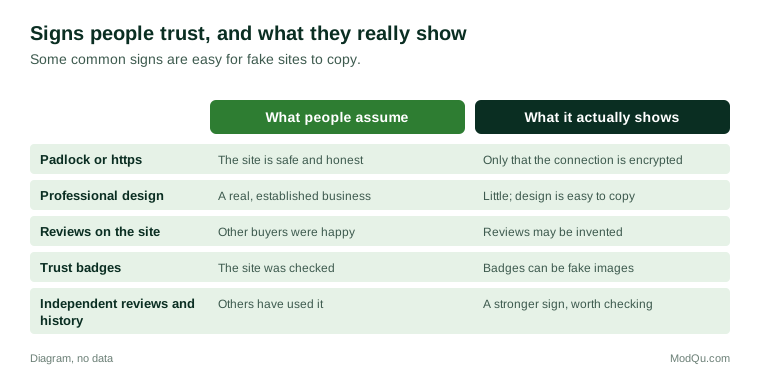
Some of these are weaker than people think. The padlock and https show that the connection is encrypted, not that the site is honest; fake sites commonly use https. Design is easy to copy. Reviews on a site can be invented, and trust badges can be fake images.
Example
A shopper looking for a sold-out gaming console finds it in stock on an unfamiliar site at a low price. The site has a padlock, smart design and glowing reviews. Before paying, they search for the site's name plus "reviews" and find several warnings from people who paid and received nothing. They do not buy.
Common types of fake and risky sites
- Fake shops that take payment and never deliver, or send counterfeit goods.
- Phishing sites that copy the look of a bank, delivery firm, tax authority or email service to steal logins.
- Lookalike domains that differ from a real address by one letter or a different ending.
- Fake ticket and travel sites.
- Investment and cryptocurrency scams with fake dashboards and testimonials.
- Unofficial service sites that charge fees for government services that are free or cheaper on the official site, such as passport or visa applications.
- Misinformation sites made to look like news outlets.
- Sites with harmful downloads offering free software, films or games with malware attached.
National cybersecurity centres, consumer protection agencies and police in many countries publish warnings and run services to report fake websites.
Example (hypothetical figures)
A person applying for a travel authorisation searches online and clicks the first result, which is an advert. The site charges 85 for a "processing service". They later learn the official government site charges 15 for the same application. They paid 70 more than needed, more than five times the official fee (85 ÷ 15 is about 5.7).
Checks that experts suggest
Advice from cybersecurity and consumer bodies generally includes:
- Check the address carefully, especially before entering a password or card details. Type known addresses directly or use a saved bookmark.
- Look up the business independently: search for its name with "reviews", "scam" or "complaints".
- Check how long the site has existed, since many fake shops are new.
- Be cautious with prices that are far below normal, and with pressure such as countdown timers.
- Pay with methods that offer protection, such as credit cards or payment services with buyer protection, and avoid bank transfers to unknown sellers.
- Use official sites for government services, usually reached through the government's main website.
- Keep devices and browsers updated, which helps block known dangerous sites.
- For information, check who wrote it, when, what sources it uses and whether other reliable sources agree.
Judging information, not only safety
For information sites, trust depends on accuracy and honesty. Researchers who study information literacy suggest "lateral reading": rather than studying one site closely, open new tabs to see what other sources say about the site and its claims. Signs that information may be unreliable include no named author, no dates, no sources, emotional language, and claims that "they don't want you to know". Official bodies, universities and established reference works are generally more reliable, though no source is perfect.
Example
A parent reads a website claiming a common food is dangerous for children. The page has no author and links only to other pages on the same site. They search the claim and find their national health service and a children's hospital both say the food is safe in normal amounts.
Who gets caught out
Anyone can be fooled by a well-made fake site. People in a hurry, people searching for scarce goods or urgent services, people unfamiliar with a language or country, and people under stress are at particular risk. Scammers also target people through adverts on search engines and social media, which can make fake sites appear alongside real ones. Many people who are caught feel embarrassed and do not report it, which makes the problem harder to measure.
What platforms and governments do
Browsers warn about known dangerous sites, search engines and social media platforms remove some scam adverts, domain registries can suspend fraudulent domains, and payment providers can block suspicious merchants. Some countries have introduced laws making platforms more responsible for scam adverts. Views differ on whether these measures are enough.
Key terms
- HTTPSA secure way of connecting to a website that encrypts data in transit; shown by a padlock in many browsers.
- Domain nameThe address of a website, such as the part after "www.".
- Lookalike domainA web address made to look like a real one with small changes.
- Phishing siteA fake website that copies a real one to steal logins or payment details.
- MalwareSoftware designed to harm a device or steal data.
- Lateral readingChecking a source by seeing what other sources say about it.
- Buyer protectionA payment provider's scheme to refund buyers in some cases of fraud or non-delivery.
- Trust badgeA symbol on a site claiming security or approval, which can be faked.
Full glossary: cybersecurity terms on EditingTests.com.
Trust in websites vocabulary test
How well do you know the language of this topic? Try 8 quick questions. Your score is shown straight away and is not saved.
What the trust in websites survey asks
This survey is part of ModQu's Digital Life and the Internet survey. The trust in websites part takes about five minutes and covers:
- How you check whether a website is safe before buying or entering details.
- Which signs make you trust a website, and which make you suspicious.
- Whether you have been tricked by a fake website, and what happened.
- Whether you reported it, and to whom.
- How you judge whether information on a website is reliable.
- Whether you feel more or less confident about online safety than a few years ago.
After that you can choose to continue with other short parts of the Digital Life and the Internet survey, such as internet use habits or search engines, or stop.
Ready to take part?
Your answers help show what people really think and do. Results are only ever reported as totals; no one can see your individual answers.
Start the surveyQuestions about this survey
Who can take part?
Adults who use the internet.
Do I have to give my name?
No. You may be asked for your age group, region and similar details so results can be broken down, but not your name. ModQu never asks for passwords, card numbers or account numbers.
How are the results used?
Answers are combined into totals and percentages and published in ModQu reports. Individual answers are never shown.
Is the vocabulary test part of the survey?
No. It is optional and separate, and your score is not stored.
Does a padlock mean a site is safe?
No. It means the connection is encrypted, so others cannot read data in transit. Fake sites can have a padlock too.
What should I do if I paid a fake website?
Many consumer and police bodies advise contacting your bank or payment provider straight away and reporting the site to the national fraud or cybersecurity reporting service.