
Share your email habits
Tell us how many email accounts you have, how many unread emails sit in your inbox and how much spam you get. Your answers are combined with other people's and reported only as totals.
Start the email surveyAbout 5 minutes. No account needed. You can stop at any time.
Why email still matters
Email remains one of the most widely used online services. Even people who chat mostly through messaging apps usually need an email address to:
- sign up for websites, apps and online shops;
- receive receipts, tickets, bills and statements;
- reset passwords and verify accounts;
- communicate with employers, schools and public services;
- apply for jobs and send documents.
At work, email is still a main channel for communication in many organisations, alongside chat tools and video meetings.
How many accounts people have
Many people keep more than one email address:
- personal addresses, sometimes an old one from years ago and a newer one;
- work or school addresses provided by an employer or institution;
- a "spare" address used for shopping and sign-ups to keep the main inbox clear;
- shared family addresses in some households;
- business addresses for the self-employed.
Most personal email accounts are free and paid for by advertising or as part of a wider service; some people pay for email with extra storage, privacy or a custom address.
Example
A freelancer uses three addresses: a personal one they have had since school, a business address with their own domain name for clients, and a third used only for online shopping and newsletters. They check the business address several times a day and the shopping address once a week.
Inbox habits
People manage email in very different ways:
- Inbox zero: keeping the inbox empty by replying, filing, archiving or deleting each message.
- Keep everything: leaving messages in the inbox and relying on search to find them later.
- Folders and labels to sort messages by topic or sender.
- Filters and rules that sort messages automatically.
- Flagging or starring messages that need action.
- Ignoring: some people rarely open their personal email and have thousands of unread messages.
Example (hypothetical figures)
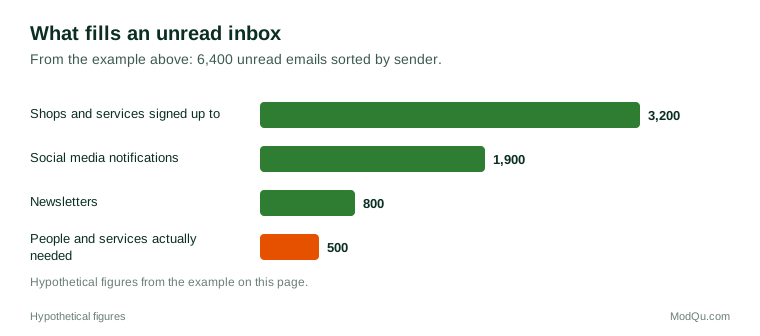
A person checks their personal inbox and finds 6,400 unread emails. They sort by sender: 3,200 are from 40 shops and services they once signed up to, 1,900 are social media notifications, 800 are newsletters and 500 are from people or services they actually need. Unsubscribing from the shops and turning off social media emails would have prevented 5,100 of the 6,400 unread messages, about 80%.
Spam, phishing and scams
Spam is unwanted bulk email, usually advertising. Email services filter most of it automatically, though some still reaches inboxes and some wanted emails are wrongly sent to spam folders.
Phishing emails pretend to come from a trusted organisation such as a bank, delivery company, tax authority or employer, and try to get people to click a link, open an attachment, enter a password or send money. Common warning signs include:
- urgent or threatening language;
- requests for passwords, card numbers or codes;
- a sender address that does not match the organisation;
- links that lead to unexpected web addresses;
- unexpected attachments;
- poor spelling or unusual greetings, though some phishing emails are well written.
National cybersecurity agencies in many countries publish advice and run services for reporting phishing emails.
Newsletters and marketing email
Many people receive newsletters and marketing emails from shops, brands, publishers and organisations. Some are welcome: news digests, offers people want, updates from local groups. Others arrive after a single purchase or sign-up. Laws in many regions require marketers to get consent before sending marketing emails and to include a way to unsubscribe. Individual newsletters written by journalists and experts have also become popular, sometimes paid by subscription.
Email at work
At work, people often describe email overload: many messages a day, long reply chains, people copied in unnecessarily and pressure to reply quickly, including outside working hours. Some organisations set rules on email after hours, and some countries have introduced a "right to disconnect" that limits expectations of out-of-hours replies. Chat tools have replaced some internal email but added their own flow of messages.
Example
A team agrees three email rules: no emails between 7 p.m. and 7 a.m. except emergencies, short subject lines that say what action is needed, and copying in only people who need to act. After two months, staff report fewer messages and fewer replies to "all".
How often people check email
Checking habits vary widely. Some people have email open all day at work and see each message as it arrives. Others check at set times, such as morning, lunch and late afternoon, to avoid constant interruptions. Many people check personal email on their phone several times a day, often while doing something else. Notifications play a big part: some people turn off email notifications entirely, while others rely on them so they do not miss anything important. People also differ in how quickly they expect replies, from within the hour at work to within a few days for personal messages.
Old accounts and digital clean-ups
Many people have old email accounts they no longer use, sometimes still linked to online accounts, subscriptions or social media. Forgotten accounts can be a security risk if they are taken over. Some people do occasional "digital clean-ups": unsubscribing from lists, deleting old messages, closing unused accounts and updating recovery details.
Email versus messaging
People increasingly use messaging apps for personal communication, especially for quick conversations and with friends and family. Email is still preferred for longer or formal messages, documents, records and communication with organisations. Many people think of email as their "official" channel and messaging as their "personal" one.
Security and privacy
Because email is used to reset passwords for many other accounts, a compromised email account can expose a person's whole digital life. Common protections include strong, unique passwords, two-step verification, checking account recovery details and being cautious with links. Some services offer encrypted email for greater privacy.
Key terms
- InboxThe folder where new email messages arrive.
- SpamUnwanted bulk email, usually advertising.
- PhishingFraudulent messages that pretend to come from a trusted source to steal information or money.
- UnsubscribeTo stop receiving emails from a mailing list.
- NewsletterA regular email sent to subscribers with news or updates.
- Inbox zeroKeeping an email inbox empty by dealing with each message.
- FilterA rule that sorts incoming emails automatically.
- Two-step verificationA second check, such as a code, needed to sign in as well as a password.
Full glossary: digital marketing terms on EditingTests.com.
Email vocabulary test
How well do you know the language of this topic? Try 8 quick questions. Your score is shown straight away and is not saved.
What the email survey asks
This survey is part of ModQu's Digital Life and the Internet survey. The email part takes about five minutes and covers:
- How many email accounts you have, and what each is for.
- How many unread emails you have, and how often you check your inbox.
- How much spam and phishing you receive, and whether you have been caught by a scam.
- How many newsletters and marketing emails you receive, and how many you read.
- Whether you use email or messaging apps more, and for what.
- How you protect your email account.
After that you can choose to continue with other short parts of the Digital Life and the Internet survey, such as internet use habits or search engines, or stop.
Ready to take part?
Your answers help show what people really think and do. Results are only ever reported as totals; no one can see your individual answers.
Start the surveyQuestions about this survey
Who can take part?
Adults.
Do I have to give my name?
No. You may be asked for your age group, region and similar details so results can be broken down, but not your name. ModQu never asks for passwords, card numbers or account numbers.
How are the results used?
Answers are combined into totals and percentages and published in ModQu reports. Individual answers are never shown.
Is the vocabulary test part of the survey?
No. It is optional and separate, and your score is not stored.
Is it safe to click unsubscribe links?
Links in emails from organisations you recognise are usually safe. For suspicious emails, many security agencies advise marking them as spam rather than clicking any link.
Why do some wanted emails go to spam?
Spam filters sometimes misjudge messages. Marking a message as not spam or adding the sender to contacts usually helps.