
Share how confident you feel online
Tell us how confident you are using computers, which digital task you find hardest and where you learn new skills. Your answers are combined with other people's and reported only as totals.
Start the digital skills surveyAbout 5 minutes. No account needed. You can stop at any time.
What digital skills include
Digital skills range from the basic to the specialist. Frameworks used by governments and international bodies, such as the European Union's digital competence framework, group them into areas like these:
- Using devices: switching on, charging, connecting to Wi-Fi, installing and updating apps.
- Information: searching, judging whether information is reliable, and saving and organising files.
- Communication: email, messaging, video calls and sharing content appropriately.
- Transactions: online shopping, banking, filling in forms, booking appointments and using public services.
- Creating content: writing documents, using spreadsheets, editing photos or video.
- Safety and security: strong passwords, recognising scams, privacy settings and backups.
- Problem solving: fixing common problems and learning new tools.
- Specialist skills: programming, data analysis, design and other work-specific abilities.
Digital skills are not only about technical ability. Confidence, judgement and knowing where to get help matter as much as knowing which button to press.
Which tasks people find hardest
When people are asked which digital tasks they find hardest, common answers include:
- setting up new devices and transferring data;
- managing passwords and two-step verification;
- recognising scams and fake websites;
- filling in long online forms, especially for government services;
- using spreadsheets and other office software;
- adjusting privacy and security settings;
- uploading documents or photos in the right format;
- using new workplace systems;
- understanding why something has stopped working.
Example
A recently retired person applies for their pension online. They manage the form but get stuck when asked to upload a scanned copy of a certificate. Their grandchild shows them how to photograph the document with their phone, save it as a file and attach it, and they finish the application.
Who feels confident and who does not
Confidence varies with age, education, work, income, disability and country. Younger people often feel confident with phones and social media but may struggle with office software, formal writing or judging reliable information. Older adults may be less confident on average, but many are skilled users, and skills vary widely within every age group. People whose jobs do not involve computers, people on low incomes and people with limited literacy or language skills can find it harder to build digital skills.
Being able to use one kind of technology does not mean being able to use all of them. Someone who is fluent with a smartphone may find a desktop computer unfamiliar, and the other way round.
Example (hypothetical figures)
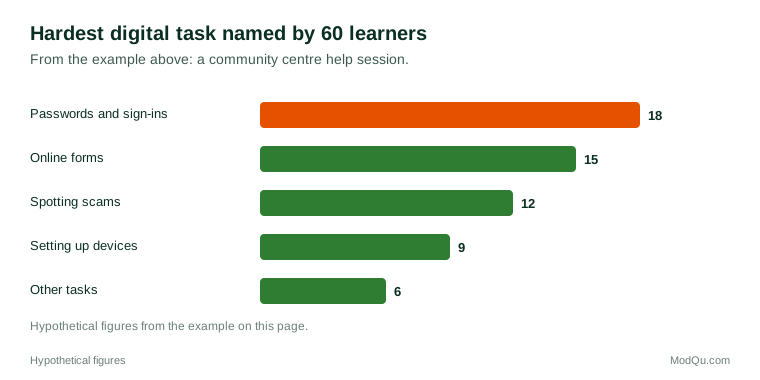
A community centre surveys 60 people who attend its digital help sessions about the task they find hardest. 18 name passwords and sign-ins, 15 name online forms, 12 name spotting scams, 9 name setting up devices and 6 name other tasks. Passwords and sign-ins are the most common answer, chosen by 30% (18 ÷ 60).
Where people learn new digital skills
People learn in many ways:
- Trial and error, the most common method for many people.
- Family and friends, especially younger relatives.
- Online videos and tutorials.
- Work training and colleagues.
- Schools, colleges and universities.
- Libraries and community centres, which in many countries offer free help sessions and courses.
- Government and charity programs aimed at people with low digital skills.
- Help built into devices and apps, and AI assistants.
Many people prefer learning one task at a time when they need it, rather than taking a course.
Helping others with technology
Many people act as informal helpers for family, friends and colleagues. Adult children set up phones for parents, grandchildren explain apps to grandparents, and colleagues help each other with new systems. This help is valuable but can be frustrating on both sides: helpers may do the task themselves rather than teach it, and people who need help may feel embarrassed to ask again. Some libraries and community groups train volunteers known as "digital champions" to help others patiently and safely.
Why digital skills matter
As more services move online, people without digital skills can find themselves at a disadvantage:
- Work: many jobs require at least basic digital skills, and job applications are often online only.
- Money: online prices and deals can be cheaper, and banking increasingly happens in apps.
- Public services: forms, benefits, health appointments and tax are often digital by default.
- Safety: people who cannot recognise scams are more exposed to fraud.
- Social connection: messaging and video calls keep many families in touch.
Some public bodies keep offline options such as phone lines and paper forms for people who cannot or do not want to go online, and campaigners argue these should remain available.
Digital skills at work
Workplaces depend increasingly on digital tools: email, chat, shared documents, scheduling systems, point-of-sale systems, data dashboards and AI tools. Employers report demand for skills ranging from basic office software to data analysis and cybersecurity. Workers report being expected to learn new systems quickly, sometimes without training.
Example
A shop assistant's employer introduces a new tablet-based stock system. The staff receive a one-hour session, but several struggle in the first weeks. Two colleagues who pick it up quickly become informal helpers, and the manager asks them to write a one-page guide for new staff.
Debates
- Digital by default. Some argue that moving services online saves money and is convenient; others say it excludes people who cannot use them.
- Whose job is training. People disagree about how much responsibility lies with schools, employers, governments and technology companies.
- AI and changing skills. AI tools may change which skills matter, making some tasks easier and adding new ones, such as judging AI output.
- Children's skills. Young people are often assumed to be skilled because they grew up with technology, but researchers point out gaps in judging information and in workplace skills.
Key terms
- Digital skillsAbilities needed to use computers, phones and the internet safely and well.
- Digital literacyThe ability to find, judge, use and create information with digital tools.
- Digital exclusionBeing unable to take part in online life because of lack of access, skills or confidence.
- Two-step verificationA second check, such as a code, needed to sign in as well as a password.
- Digital by defaultA policy of making online the main way to use a service.
- Cloud storageSaving files on remote servers accessed over the internet.
- Software updateA new version of a program that fixes problems or adds features.
- Digital competence frameworkA structured description of the digital skills people need.
Full glossary: online learning platforms terms on EditingTests.com.
Digital skills vocabulary test
How well do you know the language of this topic? Try 8 quick questions. Your score is shown straight away and is not saved.
What the digital skills survey asks
This survey is part of ModQu's Digital Life and the Internet survey. The digital skills part takes about five minutes and covers:
- How confident you feel using computers, phones and the internet.
- Which digital tasks you find hardest.
- Where you learn new digital skills.
- Whether lack of digital skills has stopped you doing something you needed to.
- Whether you help others with digital tasks, or get help from others.
- Which digital skills you would most like to learn.
After that you can choose to continue with other short parts of the Digital Life and the Internet survey, such as internet use habits or search engines, or stop.
Ready to take part?
Your answers help show what people really think and do. Results are only ever reported as totals; no one can see your individual answers.
Start the surveyQuestions about this survey
Who can take part?
Adults.
Do I have to give my name?
No. You may be asked for your age group, region and similar details so results can be broken down, but not your name. ModQu never asks for passwords, card numbers or account numbers.
How are the results used?
Answers are combined into totals and percentages and published in ModQu reports. Individual answers are never shown.
Is the vocabulary test part of the survey?
No. It is optional and separate, and your score is not stored.
Is it ever too late to learn digital skills?
No. Many libraries, community centres and charities run sessions for adults of all ages, often free.
What is the most useful skill to learn first?
Many programs start with staying safe online, such as passwords and spotting scams, because it protects people while they learn everything else.