
Share your internet habits
Tell us how many hours a day you are online, what you do most and which device you use. Your answers are combined with other people's and reported only as totals.
Start the internet use habits surveyAbout 5 minutes. No account needed. You can stop at any time.
What internet use habits cover
Internet use habits describe how, when, where and why people go online. They include:
- Time online: how many hours a day and at what times.
- Activities: communication, information, entertainment, shopping, work, learning and services.
- Devices: smartphones, computers, tablets, smart TVs, games consoles and wearables.
- Connections: mobile data, home broadband, public Wi-Fi and workplace networks.
- Cost: what people pay for data and broadband, and how cost limits use.
- Feelings: whether people feel they spend too much time online, and how they try to manage it.
Measuring time online is difficult. People are often "online" in the background, with messages and notifications arriving all day, so it is hard to separate time spent actively using the internet from time when a device is simply connected. People also tend to misjudge their own use when asked, which is one reason researchers combine surveys with device data where possible.
What people do online
The most common activities include:
- Communicating: messaging, email, voice and video calls, social media.
- Finding information: searching, reading news, checking weather and maps, looking up health or how-to information.
- Entertainment: video, music, podcasts, games, streaming TV and film.
- Shopping and payments: online shopping, banking, mobile money and paying bills.
- Work and study: email, documents, video meetings, online courses and research.
- Public services: tax, benefits, health appointments and official documents.
- Creating and sharing: posting photos, videos, reviews and comments.
The mix differs by age, country and occupation. For example, mobile money services are central to daily life in several countries in Africa and Asia, while in other places online banking through a bank's app is more common.
Example
A delivery driver uses mobile data all day for navigation and job updates, listens to podcasts between drops, checks messages at lunch and spends the evening watching video on their phone. They rarely use a computer and have no home broadband, because their phone plan includes enough data.
Devices: phone first or computer first
The smartphone is the main and often the only internet device for many people worldwide. Its advantages are low cost compared with a computer, portability and constant connection. Computers remain important for work, study, longer writing, detailed forms and some kinds of gaming. Tablets are popular with children and older adults, and smart TVs are a common way to stream video.
People who rely only on a phone can find some tasks harder, such as filling in long forms, writing assignments or comparing documents. This is sometimes called being "mobile-only" or "smartphone-dependent".
How people connect
Common types of connection include:
- Mobile networks (3G, 4G and 5G), the main connection in many countries.
- Fixed broadband through fibre, cable or telephone lines (DSL).
- Fixed wireless and satellite, important in rural and remote areas.
- Public Wi-Fi in libraries, cafés, transport and public spaces.
Speed, reliability and price vary greatly between and within countries. Rural areas often have slower or less reliable connections. The International Telecommunication Union, a United Nations agency, tracks internet access and pricing around the world.
Cost and data limits
For many people, cost shapes internet habits. Prepaid mobile users may buy data in small bundles and ration use, saving video for times when they can use free Wi-Fi. Others have unlimited plans and pay little attention to data use.
Example (hypothetical figures)
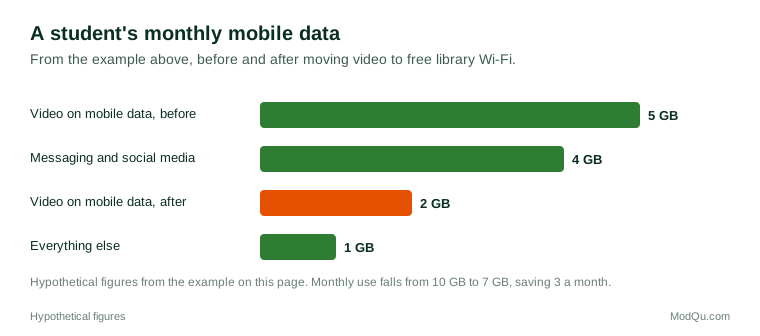
A student on a prepaid plan buys a 10 GB data bundle each month for 12. In one month they use 4 GB on messaging and social media, 5 GB on video and 1 GB on everything else. When they switch video watching to the library's free Wi-Fi, their mobile video use falls to 2 GB, and they buy a smaller 7 GB bundle for 9, saving 3 a month (36 a year).
Who gets online and who does not
Internet access has grown fast worldwide, but a large share of the world's population is still offline, according to the International Telecommunication Union. The digital divide describes gaps in access and use between:
- richer and poorer countries and households;
- urban and rural areas;
- younger and older people;
- men and women in some regions;
- people with and without disabilities;
- people with different levels of education and digital skills.
Being online also does not mean equal use: some people have fast connections and several devices, while others share one phone with limited data.
Time online and wellbeing
Many people feel they spend too much time online. Common concerns include late-night phone use affecting sleep, distraction at work and study, less time with family and friends in person, and the pull of endless feeds. People try different ways to manage their use, such as screen-time settings, turning off notifications, phone-free times or places, and deleting certain apps. Researchers continue to study how time online relates to wellbeing, and findings depend on what people do online, not only on how long.
Example
A remote worker notices they check their phone during every video meeting. They turn off notifications for social media and news apps during work hours and keep their phone in another room in the evenings. After a month, their phone's report shows their social media use has roughly halved.
When and where people go online
Internet use follows daily patterns. Many people check their phone first thing in the morning and last thing at night, use the internet for work during the day, and stream video in the evening. Commutes are a common time for messaging, music and podcasts. Weekend use often shifts towards entertainment and shopping. Place matters too: home, work, school, public transport and public spaces each bring different connections and activities.
Questions businesses want answered
Questions that internet providers, platforms, advertisers and public bodies want answered include how many hours people spend online, which activities take most time, which devices they prefer for each task, what they pay for access, and what stops some people from going online more.
Key terms
- BroadbandA high-speed internet connection, often fixed to a home or building.
- Mobile dataInternet access through a mobile phone network.
- Data bundleA set amount of mobile data bought for a period.
- Public Wi-FiWireless internet access offered in public places.
- Digital divideGaps in internet access and use between groups of people.
- Mobile-onlyUsing the internet only through a smartphone, without a computer or home broadband.
- 5GThe fifth generation of mobile network technology.
- Screen timeTime spent using devices with screens.
Full glossary: internet service providers terms on EditingTests.com.
Internet use habits vocabulary test
How well do you know the language of this topic? Try 8 quick questions. Your score is shown straight away and is not saved.
What the internet use habits survey asks
This survey is part of ModQu's Digital Life and the Internet survey. The internet use habits part takes about five minutes and covers:
- How many hours a day you are online, on work days and days off.
- What you do most online: communicating, information, entertainment, shopping, work or services.
- Which device you use most, and whether you have a computer and home broadband.
- How you connect: mobile data, broadband, public Wi-Fi or others.
- What you pay for internet access, and whether cost limits your use.
- Whether you feel you spend too much time online, and what you do about it.
After that you can choose to continue with other short parts of the Digital Life and the Internet survey, such as search engines or email, or stop.
Ready to take part?
Your answers help show what people really think and do. Results are only ever reported as totals; no one can see your individual answers.
Start the surveyQuestions about this survey
Who can take part?
Adults who use the internet.
Do I have to give my name?
No. You may be asked for your age group, region and similar details so results can be broken down, but not your name. ModQu never asks for passwords, card numbers or account numbers.
How are the results used?
Answers are combined into totals and percentages and published in ModQu reports. Individual answers are never shown.
Is the vocabulary test part of the survey?
No. It is optional and separate, and your score is not stored.
Does using the internet on a phone count the same as on a computer?
Yes, for most surveys both count as internet use. Researchers often ask about devices separately because people use them for different tasks.
Why do some people not use the internet?
Common reasons include cost, lack of a device or connection, low confidence or skills, and not seeing a need for it.