
Share how you handle cookie banners
Tell us what you usually do with cookie banners, whether you read privacy notices and whether you mind being tracked for ads. Your answers are combined with other people's and reported only as totals.
Start the cookies and online consent surveyAbout 5 minutes. No account needed. You can stop at any time.
What cookies are
A cookie is a small text file that a website stores in a person's browser. Cookies let a site remember information between visits or between pages. They are used for:
- Essential functions: keeping someone logged in, remembering a shopping basket, security.
- Preferences: language, region, display settings.
- Analytics: counting visitors and seeing which pages are used.
- Advertising and tracking: recording browsing so that adverts can be targeted, often across many sites.
First-party cookies are set by the site being visited. Third-party cookies are set by other companies, such as advertising networks, whose content appears on the site; they allow tracking across different websites. Some browsers block third-party cookies by default, and the advertising industry has been changing its methods in response.
Cookies are not the only way to track people. Other methods include tracking pixels in emails and web pages, device fingerprinting, mobile advertising IDs, and data from logged-in accounts.
Why websites ask for consent
Privacy laws in many places require websites to tell people about cookies and, for non-essential cookies, to ask for consent. In the European Union and the United Kingdom, privacy and data protection rules (including the GDPR and rules on electronic communications) are the main reason cookie banners became so common. Other regions, such as Brazil and several US states, have their own privacy laws with different requirements, and many other countries have introduced data protection laws. The rules differ: some require consent before tracking, while others give people the right to opt out of the sale or sharing of their data.
Mobile apps face similar rules, and phone operating systems have added their own prompts asking users whether to allow apps to track them across other apps.
How people respond to banners
Common responses include:
- Accept all, the quickest way to make the banner go away.
- Reject all, where the option is easy to find.
- Manage settings, choosing categories one by one.
- Ignore the banner and keep scrolling, where the site allows it.
- Leave the site, if the banner is annoying or the site seems untrustworthy.
Studies of consent banners have found that design strongly affects choices. When "Accept all" is a large coloured button and rejecting takes several clicks, far more people accept. Regulators in some countries have said that rejecting should be as easy as accepting and have taken action against misleading designs, sometimes called dark patterns.
Example (hypothetical figures)
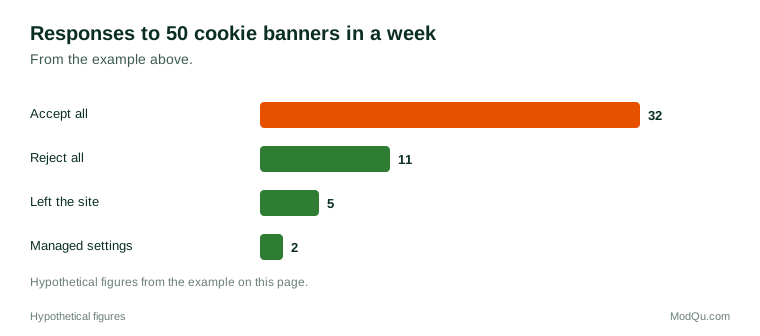
A person keeps a note of every cookie banner they meet in one week: 50 banners. They clicked "Accept all" on 32, "Reject all" on 11 and managed settings on 2, and left 5 sites without choosing. Of the 11 rejections, 9 were on sites where the reject button was on the first screen. Accepting was their most common response, at 64% (32 ÷ 50).
Privacy notices
A privacy notice (or privacy policy) explains what personal data an organisation collects, why, who it shares it with, how long it keeps it and what rights people have. Very few people read them in full. Reasons include length, legal language, the number of sites visited and a feeling that reading changes nothing because the service is needed anyway. Some organisations now offer short summaries, layered notices or privacy "labels" in app stores.
Example
Before signing up for a free fitness app, a user reads the short privacy summary in the app store. It says the app shares location and health data with partners for advertising. They choose a different app that does not share health data, even though it has fewer features.
Views on tracking for advertising
People's views differ:
- Some accept tracking as the price of free websites and apps, and like adverts that match their interests.
- Some dislike being followed around the web by adverts for something they looked at once.
- Some are concerned about sensitive data, such as health, location, religion or sexuality, being used for targeting.
- Some use ad blockers, privacy-focused browsers or tracker blockers.
- Many say they care about privacy but do not change their behaviour, which researchers call the privacy paradox.
Questions that businesses and regulators want answered include how people respond to banners, whether they understand what they agree to, and which uses of data they find acceptable.
Your rights
Depending on where they live, people may have rights to:
- see the personal data an organisation holds about them;
- correct or delete it;
- object to or opt out of certain uses, such as targeted advertising or sale of data;
- withdraw consent that they gave earlier;
- complain to a data protection authority.
How to use these rights varies between countries, and many people are unaware of them.
Example
After seeing adverts that seem to know about a recent medical appointment, a person uses their rights under local law to ask a website for a copy of the data it holds about them. They then withdraw consent for advertising cookies on that site and turn off ad personalisation in their phone's settings.
Debates
- Consent fatigue. Many people find banners tiring, and critics say constant consent requests do not give real choice.
- Browser-level settings. Some propose that people set their privacy choice once in the browser, with sites required to respect it.
- The end of third-party cookies. Changes in browsers have led to new tracking methods, and people disagree about whether these are better for privacy.
- Free versus paid. Some sites offer a choice between accepting tracking or paying a subscription, which regulators and privacy groups have questioned.
Key terms
- CookieA small text file a website stores in a browser to remember information.
- Third-party cookieA cookie set by a company other than the site being visited, often used for tracking.
- Consent bannerA notice asking visitors to accept or manage cookies.
- Privacy noticeA statement explaining what personal data an organisation collects and how it uses it.
- Dark patternA design that nudges people into choices they might not otherwise make.
- Opt outTo choose not to take part, for example in data sharing.
- GDPRThe European Union's General Data Protection Regulation.
- Privacy paradoxThe gap between people's stated privacy concerns and their behaviour.
Full glossary: data privacy terms on EditingTests.com.
Cookies and online consent vocabulary test
How well do you know the language of this topic? Try 8 quick questions. Your score is shown straight away and is not saved.
What the cookies and online consent survey asks
This survey is part of ModQu's Digital Life and the Internet survey. The cookies and online consent part takes about five minutes and covers:
- What you usually do when a cookie banner appears.
- Whether you read privacy notices or summaries, and when.
- Whether you mind being tracked for advertising, and which data you consider too sensitive.
- Whether you use ad blockers, tracker blockers or privacy settings.
- Whether you know your rights over your personal data.
- How you would prefer websites to ask for consent.
After that you can choose to continue with other short parts of the Digital Life and the Internet survey, such as internet use habits or search engines, or stop.
Ready to take part?
Your answers help show what people really think and do. Results are only ever reported as totals; no one can see your individual answers.
Start the surveyQuestions about this survey
Who can take part?
Adults who use the internet.
Do I have to give my name?
No. You may be asked for your age group, region and similar details so results can be broken down, but not your name. ModQu never asks for passwords, card numbers or account numbers.
How are the results used?
Answers are combined into totals and percentages and published in ModQu reports. Individual answers are never shown.
Is the vocabulary test part of the survey?
No. It is optional and separate, and your score is not stored.
Is it safe to reject cookies?
Yes. Rejecting non-essential cookies usually does not stop a site working, though some preferences may not be remembered.
Can I change my cookie choice later?
Many sites have a link, often at the bottom of the page, to change cookie settings. Browsers also let people delete cookies.