
Share your experience of smart home devices
Tell us which devices you own, how you use them and what concerns you. Your answers are combined with other people's and reported only as totals.
Start the smart home devices surveyAbout 5 minutes. No account needed. You can stop at any time.
What smart home devices are
A smart home device is an ordinary household item that connects to the internet or to a home network so that it can be controlled from a phone, by voice, or on a schedule. Many devices also collect information, such as temperature, motion or video, and send it to an app.
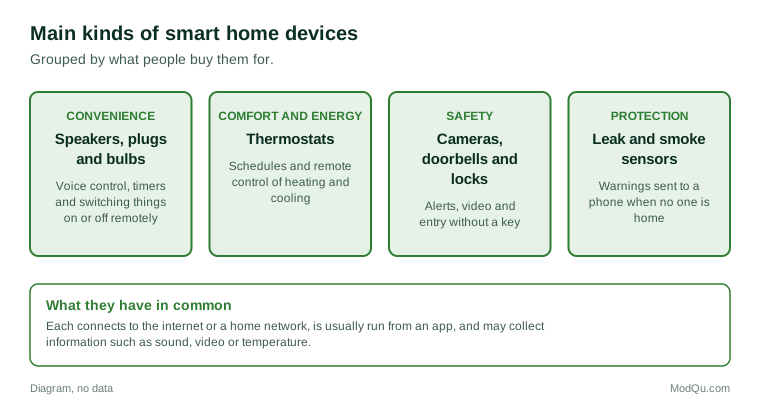
The most common kinds are:
- Smart speakers and displays that respond to voice commands, play music, answer questions and control other devices.
- Smart thermostats that learn a routine and can be adjusted from a phone.
- Video doorbells and security cameras that record and send alerts.
- Smart plugs and light bulbs that can be switched on and off remotely or on a timer.
- Smart locks that open with a code, a phone or a fingerprint.
- Leak and smoke sensors that send a warning to a phone.
- Connected appliances, such as washing machines, ovens and robot vacuums.
Why people buy them
People give different reasons for buying smart devices, and the reason often depends on the device:
- Convenience: turning lights off from bed, or starting the robot vacuum while out.
- Saving energy: a thermostat that lowers the heat when no one is home.
- Safety and peace of mind: a doorbell camera that shows who is at the door, or a leak sensor in the basement.
- Accessibility: voice control helps people with limited mobility or sight.
- Caring at a distance: adult children sometimes install sensors or cameras for an older parent who lives alone.
- Interest in technology for its own sake.
Many devices are bought as gifts or come bundled with something else, such as a speaker offered with a music subscription or a thermostat offered by an energy program. Some owners never set them up fully.
Example
A homeowner installs a smart thermostat after their utility offers a rebate. For the first winter they use the app often and lower the heat on weekdays while at work. By the second winter they rarely open the app, but the schedule they set still runs each day.
Ecosystems and compatibility
Smart devices work best when they can talk to each other. Most are sold as part of an ecosystem built around one voice assistant or app. A household that starts with one brand of speaker often buys other devices that work with it.
Compatibility has been a long-standing frustration. A light bulb from one maker may not work with a speaker from another, or may need its own separate app. Industry groups have developed shared standards so devices from different makers can work together, but many homes still have a mix of apps and hubs.
Example
A couple ends up with five different apps: one for the speaker, one for the doorbell, one for the bulbs, one for the robot vacuum and one for the garage door opener. When they want the hall light to come on when the doorbell rings, they find two of the devices cannot be linked. They replace the bulbs with ones that work with their speaker.
Privacy and security concerns
Privacy is the concern people mention most often. Devices with microphones and cameras raise questions about what is recorded, where recordings are stored, who can see them, and how long they are kept. Common worries include:
- a speaker listening or recording when it should not;
- camera footage being seen by staff at the company or shared with police;
- data being used for advertising;
- devices being hacked because of weak passwords or old software.
In Canada, the Office of the Privacy Commissioner of Canada publishes guidance for consumers on connected devices. Basic steps often recommended include changing default passwords, keeping devices updated, and reviewing privacy settings in each app.
Survey research often finds that many owners say they are worried about privacy and still keep the devices. Asking about both the concern and the behaviour gives a fuller picture than asking about either one alone.
Example
A renter installs a doorbell camera. A neighbour across the hall asks whether it records them every time they leave their apartment. The renter adjusts the camera's motion zone so it covers only their own doorway and turns off audio recording.
Costs and what people expect
Smart devices range from inexpensive plugs to costly locks, cameras and appliances. Some costs are not obvious at first:
- Subscriptions for storing camera video or for extra features.
- Replacement when a maker stops supporting a device or shuts down its service.
- Installation, especially for thermostats, locks and wired doorbells.
- A good home network, since many devices need a strong Wi-Fi signal.
Example (hypothetical figures)
A household buys two cameras at $90 each and a video storage plan at $5 a month. Over three years the cameras cost $180 and the plan costs $180, so the storage plan doubles the total cost to $360.
Common problems
People who have owned smart devices for a while often report the same kinds of problems:
- devices dropping off Wi-Fi and needing to be reset;
- apps changing after updates;
- voice assistants misunderstanding commands;
- devices that stop working when the internet is down;
- products that stop being supported after a few years.
Renters face their own issues. A landlord may not allow changes to locks or thermostats, and devices may have to be removed when moving out.
Trends and what people disagree about
Smart features are being built into more ordinary products, so some people now own smart devices without having chosen them. Energy programs are also linking smart thermostats to the grid so that heating and cooling can be reduced briefly during peak demand, usually with the owner's agreement.
Opinion is divided on several questions: whether convenience is worth the privacy trade-off, whether devices should keep working without an internet connection, whether makers should have to support devices for a minimum number of years, and whether cameras pointed at streets and shared hallways are fair to neighbours.
Key terms
- Smart speakerA speaker with a voice assistant that responds to spoken commands.
- Voice assistantSoftware that understands spoken requests and acts on them.
- EcosystemA group of devices and apps from one company that work together.
- HubA device that connects other smart devices to each other and the network.
- Wake wordThe word or phrase that tells a voice assistant to start listening.
- Motion zoneThe area a camera watches for movement.
- Default passwordThe password a device comes with, which should be changed.
- FirmwareSoftware built into a device that controls how it works.
Full glossary: smart home platforms terms on EditingTests.com.
Smart home devices vocabulary test
How well do you know the language of this topic? Try 8 quick questions. Your score is shown straight away and is not saved.
What the smart home devices survey asks
This survey is part of ModQu's Technology at Home survey. The smart home devices part takes about five minutes and covers:
- Which smart home devices you own, and how long you have had them.
- Why you bought them, or why you have not.
- How often you use each one, and for what.
- How concerned you are about what they record or collect.
- Problems you have had with setup, compatibility or support.
- Which device you are most likely to buy next, if any.
After that you can choose to continue with other short parts of the Technology at Home survey, such as smartphones and mobile apps or internet and mobile plans, or stop.
Ready to take part?
Your answers help show what people really think and do. Results are only ever reported as totals; no one can see your individual answers.
Start the surveyQuestions about this survey
Who can take part?
Homeowners and renters.
Do I have to give my name?
No. You may be asked for your age group, region and similar details so results can be broken down, but not your name. ModQu never asks for passwords, card numbers or account numbers.
How are the results used?
Answers are combined into totals and percentages and published in ModQu reports. Individual answers are never shown.
Is the vocabulary test part of the survey?
No. It is optional and separate, and your score is not stored.
Do I need to own a smart device to take part?
No. People who do not own any smart home devices are asked why, and what would change their mind.
Will the survey ask me to connect a device?
No. The survey only asks questions. It never asks you to link an account, a device or an app.