
Share your experience of staying safe online
Tell us how you protect your accounts, what scams you have seen and how you feel about sharing data. Your answers are combined with other people's and reported only as totals.
Start the online privacy and security surveyAbout 5 minutes. No account needed. You can stop at any time.
What this topic covers
Online privacy and online security are linked but not the same:
- Security is about keeping accounts, devices and money safe from people who should not have access: hackers, scammers and thieves.
- Privacy is about who collects personal information, what they do with it, and how much control people have over it.
This topic covers both: password habits, two-step login, scams and fraud, data breaches, and attitudes to sharing data with companies and governments. In Canada, the Canadian Anti-Fraud Centre collects reports of fraud and scams, and the Office of the Privacy Commissioner of Canada oversees how federally regulated organizations handle personal information.
Passwords and logging in
Passwords remain the main way people protect accounts, and they are also the weak point for many. Common habits that put accounts at risk include:
- using the same password on many sites;
- using short or easy-to-guess passwords, such as names and birthdays;
- writing passwords on paper near the computer;
- sharing passwords with family or friends.
Ways people make logins safer include:
- Password managers, which create and store a different strong password for each site.
- Two-step verification (also called two-factor or multi-factor authentication), which asks for a second proof, such as a code sent to a phone, after the password.
- Passkeys, a newer method that uses the phone or computer itself, often with a fingerprint or face scan, in place of a password.
- Long passphrases made of several unrelated words.
Example
A retired teacher uses one password for email, online banking and shopping. After a shopping site they used reports a data breach, someone tries to log in to their email from another country. Their son helps them set up a password manager and turn on two-step verification for their email and bank.
The example shows why email accounts matter so much: a person who controls someone's email can often reset the passwords for their other accounts.
Scams and fraud
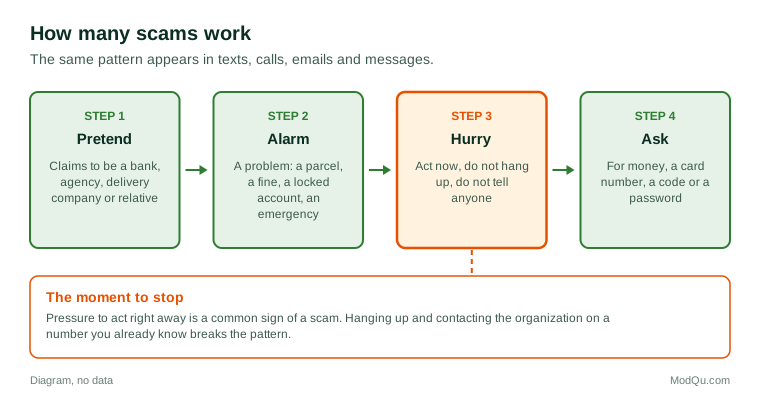
Scams change constantly, but many follow the same pattern: they create urgency, pretend to be someone trusted, and ask for money or information. Common types include:
- Phishing: emails or texts that look like they come from a bank, a delivery company or a government agency and link to a fake website.
- Phone scams: callers pretending to be from the tax agency, the police or a bank's fraud department.
- Romance scams: someone builds an online relationship and then asks for money.
- Investment scams: promises of high returns, often in cryptocurrency.
- Marketplace scams: fake buyers or sellers on online classified sites.
- Emergency scams: a call or message claiming a family member is in trouble and needs money now.
Example
A student gets a text saying a parcel could not be delivered and asking them to pay a $2.99 redelivery fee through a link. They are expecting a package, so they click and enter their card number. Two days later, several charges they did not make appear on the card. They call their bank, which cancels the card and investigates the charges.
Questions businesses and public bodies want answered here include how many people have been targeted, how many lost money, whether they reported it, and what would have stopped them.
Data breaches
A data breach happens when information held by an organization is stolen or exposed. It may include names, emails, passwords, addresses, card numbers or health information. In Canada, organizations covered by federal privacy law must report breaches that create a real risk of significant harm to the Privacy Commissioner and tell the people affected.
People respond to breach notices in different ways. Some change passwords and watch their bank statements; some sign up for credit monitoring; others ignore the notice because they receive so many. A breach notice is also a common disguise for phishing, so people are often advised to go to the organization's website directly rather than click a link in the message.
Sharing data with companies
Many free apps and services are paid for, in part, with personal data. Loyalty programs, social media, fitness apps and search engines collect information about what people do, which can be used for advertising or to improve services.
People's attitudes vary widely:
- some are comfortable sharing data in return for a discount or a more useful service;
- some share reluctantly because they feel they have no real choice;
- some avoid services they think collect too much.
Survey research often describes a "privacy paradox": people say they care a lot about privacy but still accept terms and permissions they have not read. One reason is that privacy policies are long and hard to understand, so accepting them becomes a habit.
Example (hypothetical figures)
A grocery loyalty app offers $10 off a $100 shop to members who allow it to track their purchases. A household that spends $200 a week but uses the offer once a month saves $120 a year. Asked in a survey, one partner says the saving is worth it; the other says they would not have joined if they had known how much purchase data is kept.
Protecting children and older adults
Two groups get particular attention. Parents worry about what children share online, who they talk to, and what data apps collect about them. Families of older adults worry about scams that target people who are less familiar with technology or who live alone. In both cases, people often rely on a family member who is seen as the "tech person" to set up devices and check settings.
What people disagree about
Opinion is divided on several questions: whether companies or users should be responsible for keeping accounts safe, how much data governments should be able to access, whether apps should have to ask before tracking, whether banks should refund all scam losses, and how strict privacy laws should be. These views often depend on personal experience, which is why surveys ask about both attitudes and what has happened to people.
Key terms
- PhishingA message that pretends to be from a trusted source to steal information.
- Two-step verificationA login that needs a second proof, such as a code, after the password.
- Password managerAn app that creates and stores strong passwords.
- PasskeyA login method that uses your device and a fingerprint, face or PIN instead of a password.
- Data breachWhen information held by an organization is stolen or exposed.
- MalwareSoftware designed to harm a device or steal information.
- Identity theftUsing someone else's personal information to commit fraud.
- Privacy policyA document explaining how an organization collects and uses personal data.
Full glossary: data privacy terms on EditingTests.com.
Online privacy and security vocabulary test
How well do you know the language of this topic? Try 8 quick questions. Your score is shown straight away and is not saved.
What the online privacy and security survey asks
This survey is part of ModQu's Technology at Home survey. The online privacy and security part takes about five minutes and covers:
- How you protect your main accounts: passwords, password managers and two-step verification.
- Whether you have been targeted by a scam or fraud, and what happened.
- Whether you reported it, and to whom.
- Whether you have received a data breach notice, and what you did.
- How you feel about sharing personal data for discounts or free services.
- Who you trust most to keep your data safe.
After that you can choose to continue with other short parts of the Technology at Home survey, such as smartphones and mobile apps or internet and mobile plans, or stop.
Ready to take part?
Your answers help show what people really think and do. Results are only ever reported as totals; no one can see your individual answers.
Start the surveyQuestions about this survey
Who can take part?
Internet users.
Do I have to give my name?
No. You may be asked for your age group, region and similar details so results can be broken down, but not your name. ModQu never asks for passwords, card numbers or account numbers.
How are the results used?
Answers are combined into totals and percentages and published in ModQu reports. Individual answers are never shown.
Is the vocabulary test part of the survey?
No. It is optional and separate, and your score is not stored.
Will the survey ask for my passwords?
No. ModQu never asks for passwords, PINs or account numbers. Anyone who does is not ModQu.