
Share your experience of backing up
Tell us how you back up your photos and files and whether you have ever lost something important. Your answers are combined with other people's and reported only as totals.
Start the cloud storage and backups surveyAbout 5 minutes. No account needed. You can stop at any time.
What this topic covers
A backup is a second copy of a file kept somewhere else, so that it can be recovered if the original is lost, damaged or deleted. Cloud storage means keeping files on servers run by a company and reaching them over the internet. The two overlap but are not the same: a file kept only in the cloud is not backed up, and a backup does not have to be in the cloud.
This topic covers:
- Automatic phone backups of photos, contacts and settings.
- Cloud storage services for documents and photos, free and paid.
- External drives and USB sticks used at home.
- Network storage devices that some households set up on their home network.
- Data loss: how it happens, and what people do to get files back.
How people back up today
Habits vary widely. Some people have every photo copied automatically to the cloud without thinking about it, because their phone was set up that way. Others back up by plugging a phone into a computer once in a while. Some do not back up at all.
Common methods include:
- Phone cloud backup, which copies photos and settings each night when the phone is charging on Wi-Fi.
- Sync folders on a computer that keep a copy of files in the cloud and on other devices.
- Email or messaging to oneself, an informal method many people use for important documents.
- External hard drives used with the computer's built-in backup tool.
- Printing important photos and documents, which some people still see as the safest copy.
Example
A family keeps 15 years of photos on an old laptop. When the laptop's drive fails, a repair shop is able to recover most of the files for a fee. The family then turns on automatic cloud backup for their phones and buys an external drive for the laptop, so the photos now exist in three places.
Sync is not the same as backup
Many people believe their files are backed up when they are in fact only synced. A sync service keeps the same files on several devices and in the cloud. If a file is deleted or damaged on one device, the change can be copied to all the others.
A true backup keeps earlier versions, so that a file deleted by mistake or scrambled by ransomware can be restored as it was. Many cloud services offer version history and a "recently deleted" folder for a set time, which helps, but people often do not know how long deleted items are kept.
Example
A student deletes a folder of old assignments to free up space on their laptop. A week later they realize their final project was inside. Because the folder was synced, it has also disappeared from the cloud, but the service's recently deleted folder still holds it for 30 days, and they restore it.
The 3-2-1 rule
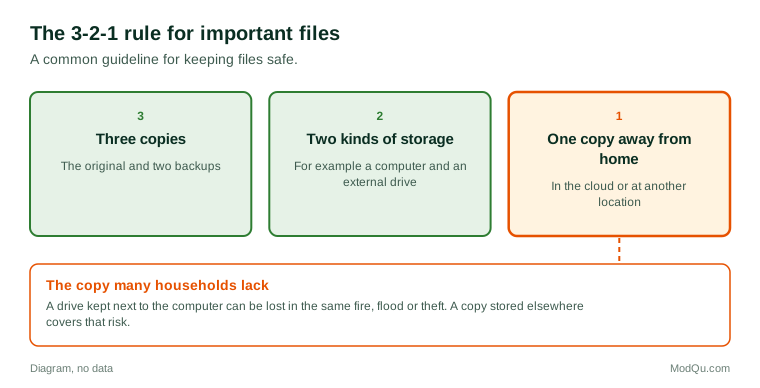
A common guideline for important files is the 3-2-1 rule: keep at least three copies of your data, on two different kinds of storage, with one copy kept away from home. For a household, that might mean the original on a computer, a copy on an external drive, and a copy in the cloud.
Few households follow the rule fully. Many people have one copy in the cloud and assume that is enough. Questions businesses want answered include how many people back up at all, which method they use, and what would make them back up more often.
Paying for storage
Most cloud services offer a small amount of storage free and charge for more. Phones with high-resolution cameras and video fill free storage quickly, so many people start paying once their free space runs out, often after a warning on their phone.
Things people weigh when paying include:
- price per month or per year;
- how much space they need for photos and videos;
- whether storage can be shared with family members;
- which phone and computer they use, since some services work better with certain devices;
- privacy and where the data is stored.
Example (hypothetical figures)
A couple pays $3.99 a month each for two separate storage plans. A family plan with more space costs $12.99 a month for up to five people. Switching would cost $5.01 more a month, or about $60 a year, but would also cover their two teenagers, who are both out of free space.
Some people pay for several storage services without realizing it, because each was started on a different device or bundled with another subscription.
Losing data and getting it back
Ways people lose files include:
- a lost, stolen or broken phone;
- a computer drive that fails;
- deleting something by mistake;
- ransomware, which locks files and demands payment;
- losing access to an account, for example after forgetting a password or losing the phone used for two-step login;
- a family member's death, when no one knows how to reach their accounts.
Recovery is sometimes possible through a cloud service's deleted items, a repair shop, or a professional data recovery company, which can be costly. The last point, access after death, has led some services to offer legacy contact settings, which let a person choose who can reach their account if they die.
Privacy and trust
People choosing cloud storage often ask where their files are kept, who can see them, and whether the company scans them. Some prefer services that offer end-to-end encryption, where only the owner can unlock the files. Others choose local storage at home because they do not want personal photos on a company's servers.
What people disagree about
Opinion is divided on whether cloud storage is safer than storage at home, whether free storage should be larger, whether paying a monthly fee forever is better than buying a drive once, and how much responsibility companies should take when an account is locked or files are lost. Surveys help show how habits differ by age and by how much people have lost before.
Key terms
- BackupA second copy of a file kept somewhere else.
- Cloud storageKeeping files on a company's servers and reaching them online.
- SyncKeeping the same files matched across devices and the cloud.
- Version historyEarlier saved versions of a file that can be restored.
- External driveA storage device plugged into a computer.
- RansomwareMalware that locks files and demands payment.
- EncryptionScrambling data so only someone with the key can read it.
- Legacy contactA person chosen to access an account after the owner dies.
Full glossary: cloud storage platforms terms on EditingTests.com.
Cloud storage and backups vocabulary test
How well do you know the language of this topic? Try 8 quick questions. Your score is shown straight away and is not saved.
What the cloud storage and backups survey asks
This survey is part of ModQu's Technology at Home survey. The cloud storage and backups part takes about five minutes and covers:
- Whether you back up your photos and files, and how.
- How often your backups happen, and whether they are automatic.
- Whether you pay for cloud storage, which plan, and how much.
- Whether you have ever lost important files, and whether you got them back.
- How much you trust cloud services with your personal files.
- What would make you back up more, or change how you store files.
After that you can choose to continue with other short parts of the Technology at Home survey, such as smartphones and mobile apps or internet and mobile plans, or stop.
Ready to take part?
Your answers help show what people really think and do. Results are only ever reported as totals; no one can see your individual answers.
Start the surveyQuestions about this survey
Who can take part?
Internet users.
Do I have to give my name?
No. You may be asked for your age group, region and similar details so results can be broken down, but not your name. ModQu never asks for passwords, card numbers or account numbers.
How are the results used?
Answers are combined into totals and percentages and published in ModQu reports. Individual answers are never shown.
Is the vocabulary test part of the survey?
No. It is optional and separate, and your score is not stored.
Will the survey ask me to share or upload files?
No. The survey only asks questions about your habits. It never asks you to upload anything.