
Share how your business chooses software
Tell us which software your business relies on, who decides what to buy and what would make you switch. Your answers are combined with other people's and reported only as totals.
Start the business software surveyAbout 5 minutes. No account needed. You can stop at any time.
What business software covers
Business software is any program a business uses to run its operations. For a small firm it might be a few tools: email, a calendar, accounting software, a payment system and a website. Larger firms may use hundreds of applications across departments. This survey is for people who choose or help choose software in a business.
The main categories are:
- Productivity and communication: email, documents, spreadsheets, video calls and team chat.
- Accounting, payroll and invoicing.
- Customer relationship management (CRM): tracking customers, leads and sales.
- Point of sale and e-commerce: tills, card payments and online stores.
- Enterprise resource planning (ERP): linked systems for finance, inventory, purchasing and operations.
- Human resources: hiring, scheduling, time tracking and employee records.
- Project and task management.
- Industry-specific software, such as practice management for clinics, job management for trades, or reservation systems for restaurants.
- Security tools: antivirus, backup, password managers and access controls.
Cloud and subscription software
Most new business software is sold as software as a service (SaaS): the business pays a monthly or yearly subscription, often per user, and the software runs on the provider's servers and is accessed through a browser or app. Older software was usually bought once and installed on the business's own computers, with paid upgrades.
Subscriptions have advantages: lower starting costs, automatic updates, access from anywhere, and less need for in-house IT. They also have drawbacks: costs that rise as a business adds users, price increases at renewal, dependence on an internet connection, and questions about where data is stored and who controls it.
Example (hypothetical figures)
A company of 12 people uses five subscription tools: email and documents at $15 per user a month, a CRM at $40 per user for 4 sales staff, project management at $10 per user, accounting at $90 a month and scheduling at $60 a month. The monthly total is $180 plus $160 plus $120 plus $90 plus $60, which is $610, or $7,320 a year. When the team grows to 15, the per-user tools add $75 a month.
Who decides what to buy
In small businesses, the owner often decides, sometimes on advice from an accountant, an IT contractor or a staff member who uses the tool. In larger firms, buying decisions involve several people:
- Users, who know what the work needs.
- Department managers, who own the budget.
- IT staff, who check security, compatibility and support.
- Finance, who review cost and contracts.
- Senior leaders, for large or company-wide systems.
Software is also adopted from the bottom up, when staff start using a free or low-cost tool and it spreads before anyone formally approves it. This is sometimes called shadow IT, and it can create security and data problems.
The buying process
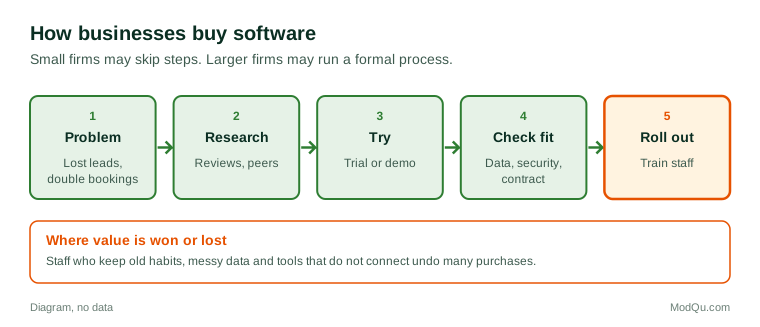
Businesses buying software often follow steps like these:
- Identify a problem, such as lost sales leads, double bookings or slow invoicing.
- Research options through recommendations, review sites, industry groups and vendor websites.
- Shortlist and compare features, prices and support.
- Try it, with a free trial or demo.
- Check fit: integration with existing tools, data migration, security and contract terms.
- Decide and negotiate.
- Roll out and train staff.
Smaller businesses may skip many steps and choose quickly; larger ones may run a formal request for proposals.
Example
A physiotherapy clinic with three locations wants online booking. The office manager tries two systems for a month each. One is cheaper, but it cannot send reminders by text, which the clinic expects will cut missed appointments. The clinic chooses the other and asks the vendor to help move five years of patient appointment history.
Rollout, training and getting value
Buying software is often easier than getting people to use it well. Common problems include:
- staff who keep using old methods or spreadsheets;
- too little training time;
- data that is messy or incomplete when moved from the old system;
- tools that do not connect, so information has to be typed twice;
- features the business pays for but never uses.
Businesses that get the most value usually name someone to own the tool, train staff, clean their data before moving it, and review use after a few months.
Costs beyond the subscription
The full cost of software includes more than the price list: setup, data migration, training, integrations, customization, add-ons, extra storage, support plans and staff time. When comparing tools, some businesses estimate the total cost of ownership over several years.
Switching software
Businesses switch for reasons such as price increases, missing features, poor support, outages, a merger, rapid growth, or a better product appearing. Many stay with tools they dislike because switching is costly and risky: data must be exported and imported, staff retrained and processes changed. Some vendors make it hard to export data in a usable form, which is called lock-in.
Example
A retail shop has used the same point-of-sale system for eight years. After the vendor raises fees and stops supporting the shop's card terminal, the owner compares three new systems. The new system costs less per month, but the shop has to buy new terminals and spend a weekend re-entering 2,000 products. The owner says they would have switched two years earlier if moving the product list had been easier.
Security, data and trends
Business software holds customer records, financial data and employee information, so security and privacy matter. Businesses look at where data is stored, how access is controlled, whether two-factor authentication is offered, how backups work and what the vendor does after a breach. In Canada, businesses remain responsible for personal information they hand to software providers under federal and provincial privacy laws.
Trends include automation and artificial intelligence features built into everyday tools, low-code platforms that let staff build simple apps, software bundles from a single vendor, and growing attention to subscription costs. Debates include how much to rely on one vendor, how to control the spread of tools, and whether new features justify higher prices. Questions businesses want answered include which tools firms rely on most, who decides, what they pay and what would make them switch.
Key terms
- SaaSSoftware as a service, sold by subscription and run on the provider's servers.
- CRMCustomer relationship management software for tracking customers and sales.
- ERPEnterprise resource planning software that links finance, inventory and operations.
- IntegrationA connection that lets two software tools share data.
- Data migrationMoving data from an old system to a new one.
- Shadow ITSoftware used in a business without formal approval.
- Lock-inWhen switching away from a vendor is hard or costly.
- Total cost of ownershipAll costs of a tool over time, not only its price.
Full glossary: software development terms on EditingTests.com.
Business software vocabulary test
How well do you know the language of this topic? Try 8 quick questions. Your score is shown straight away and is not saved.
What the business software survey asks
This survey is part of ModQu's Business and Professional Services survey. The business software part takes about five minutes and covers:
- Which software your business relies on most, and for what.
- Who decides what software to buy, and who else has a say.
- How you research and compare options before buying.
- What you spend on software each month or year, roughly.
- Whether you have switched software recently, and why.
- What would make you switch from a tool you use now.
After that you can choose to continue with other short parts of the Business and Professional Services survey, such as small business owners or accounting and bookkeeping, or stop.
Ready to take part?
Your answers help show what people really think and do. Results are only ever reported as totals; no one can see your individual answers.
Start the surveyQuestions about this survey
Who can take part?
People who choose software in a business.
Do I have to give my name?
No. You may be asked for your age group, region and similar details so results can be broken down, but not your name. ModQu never asks for passwords, card numbers or account numbers.
How are the results used?
Answers are combined into totals and percentages and published in ModQu reports. Individual answers are never shown.
Is the vocabulary test part of the survey?
No. It is optional and separate, and your score is not stored.