
Share your experience of AI at work
Tell us whether you use AI tools at work, what your employer allows and how you feel about it. Your answers are combined with other people's and reported only as totals.
Start the artificial intelligence at work surveyAbout 5 minutes. No account needed. You can stop at any time.
What artificial intelligence at work covers
Artificial intelligence (AI) is a broad term for computer systems that perform tasks normally associated with human thinking, such as recognizing speech, spotting patterns, making predictions or producing text and images. At work, people meet AI in two main ways.
The first is tools that workers choose to use directly, such as chat assistants that draft emails, summarize documents, write computer code, translate text or answer questions. These are often called generative AI because they generate new text, images or sound.
The second is AI built into systems that workers may not notice: software that routes customer calls, flags suspicious payments, plans delivery routes, screens job applications, predicts stock levels or reads medical scans. Here workers usually use the outputs rather than the tool itself.
How people use AI tools
Common uses reported by workers include:
- drafting emails, letters and reports;
- summarizing long documents, meetings or research;
- translating text between languages;
- writing, checking and explaining computer code;
- brainstorming ideas and outlines;
- analyzing spreadsheets and data;
- creating images or presentation slides;
- answering customer questions through chatbots.
Use varies widely by job. Office, technical and creative roles have seen the fastest uptake. In manual, care and front-line jobs, AI is more often part of scheduling, monitoring or equipment than something workers use themselves.
Example
A customer service worker uses an AI tool to suggest replies to emails. They edit each suggestion before sending it. They find it saves time on routine questions about delivery dates, but they write complaints replies themselves because the suggestions often miss the customer's main point.
What employers allow
Employers' approaches vary from open encouragement to outright bans. Common positions include:
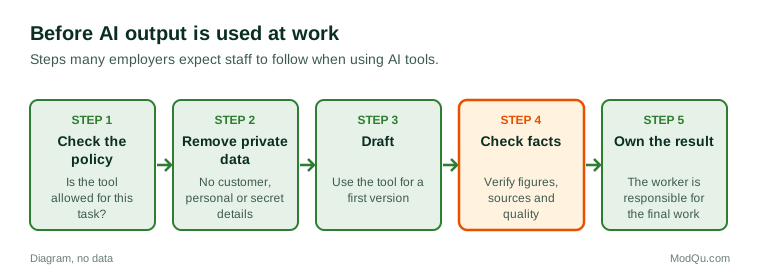
- Approved tools only: staff may use tools the employer has checked and licensed.
- Use with limits: staff may use tools but must not enter confidential, personal or customer data.
- Disclosure rules: staff must say when work was produced with AI help.
- Bans: some employers, especially those handling sensitive information, forbid public AI tools.
- No policy: many workplaces have no written rules, leaving staff unsure.
Some workers use AI tools without their employer knowing, either because there is no policy or because they want to save time. This raises questions about data security and about who is responsible for mistakes.
Benefits and problems
Workers and employers describe several benefits: time saved on routine writing and searching, help with tasks in a second language, faster first drafts, and support for people who find writing difficult.
Problems are also common:
- Errors: AI tools can produce confident but wrong answers, invented sources or faulty calculations.
- Privacy and confidentiality: entering customer or company data into public tools may break rules or laws.
- Bias: systems trained on past data may repeat unfair patterns, for example in screening job applicants.
- Copyright and ownership: it is not always clear who owns AI-generated material or what it was trained on.
- Over-reliance: skills may weaken if people stop doing tasks themselves.
- Monitoring: AI can be used to track workers' speed, keystrokes or location, which many find intrusive.
Example
A junior analyst asks an AI tool for figures on a market and pastes them into a client report. The client asks where the figures come from, and the analyst finds the tool gave no real source. The firm adds a rule that every figure must be checked against an original source.
Jobs, skills and worries
The effect of AI on jobs is one of the most debated questions about work. Some tasks are being automated, and some roles may shrink, especially those based on routine writing, data entry or simple customer contact. At the same time, new tasks appear, such as checking AI output, managing AI systems and training others to use them. Many researchers expect AI to change tasks within jobs more often than to remove whole jobs, but there is no agreement on how fast or how widely this will happen.
Workers' feelings differ. Some feel AI makes their work easier and more interesting. Others worry about job loss, lower pay, being monitored or having to learn new skills quickly. Worries are often higher where employers have said little about their plans.
Example (hypothetical figures)
An office of 60 staff runs a short survey. Of those who answer, 36 say they use an AI tool at least once a week, 15 say they never use one, and 9 are unsure whether they are allowed to. When asked about the next five years, 24 say they are worried that AI will change their job.
Rules and laws
Governments are developing rules on AI. The European Union adopted the AI Act in 2024, which sets duties based on the level of risk and treats some uses in employment, such as recruitment and decisions about workers, as high-risk. Other countries rely on existing data protection, equality and employment laws, or are drafting their own rules. Unions and worker groups in several countries have negotiated agreements about how AI may be introduced at work.
What people disagree about
People disagree about whether AI will create more jobs than it removes, whether workers should share in productivity gains, how much monitoring is acceptable, and who is responsible when an AI-assisted decision goes wrong. There are also different views on whether schools and employers should train people to use AI or limit its use.
Questions that employers, training providers and software firms want answered include how many workers use AI tools, for what tasks, whether employers allow it, and how worried people are about their jobs.
Key terms
- Artificial intelligenceComputer systems that perform tasks associated with human thinking.
- Generative AIAI that produces new text, images, sound or code.
- ChatbotA program that answers questions in a conversation, by text or voice.
- PromptThe instruction or question a user gives an AI tool.
- HallucinationA confident but false answer produced by an AI tool.
- AutomationUsing machines or software to do tasks people used to do.
- Algorithmic managementUsing software to assign, monitor or rate workers.
- Acceptable use policyAn employer's rules on how staff may use a tool or system.
Full glossary: artificial intelligence terms on EditingTests.com.
Artificial intelligence at work vocabulary test
How well do you know the language of this topic? Try 8 quick questions. Your score is shown straight away and is not saved.
What the artificial intelligence at work survey asks
This survey is part of ModQu's Work and Careers survey. The artificial intelligence at work part takes about five minutes and covers:
- Whether you use AI tools in your job, and how often.
- Which tasks you use them for.
- What your employer allows, and whether there is a written policy.
- Whether AI tools have saved you time or caused problems.
- How worried you are that AI will change or replace your job.
- What training or rules you would like on AI at work.
After that you can choose to continue with other short parts of the Work and Careers survey, such as job satisfaction or remote and hybrid work, or stop.
Ready to take part?
Your answers help show what people really think and do. Results are only ever reported as totals; no one can see your individual answers.
Start the surveyQuestions about this survey
Who can take part?
Employees.
Do I have to give my name?
No. You may be asked for your age group, region and similar details so results can be broken down, but not your name. ModQu never asks for passwords, card numbers or account numbers.
How are the results used?
Answers are combined into totals and percentages and published in ModQu reports. Individual answers are never shown.
Is the vocabulary test part of the survey?
No. It is optional and separate, and your score is not stored.
Does using a spell checker count as using AI?
The survey focuses on tools that generate or analyze content, such as chat assistants, and on AI built into work systems. Basic spell checkers are not the main interest.
Can my employer see that I used an AI tool?
It depends on the tool and the employer's systems. Approved tools are often logged, and many employers have rules about disclosure.
Will AI take my job?
No one can say for a given job. Many researchers expect AI to change tasks within jobs more often than to remove whole jobs, but views differ.