
Share your experience of your phone
Tell us which phone you use, how long you keep it and how you use apps. Your answers are combined with other people's and reported only as totals.
Start the smartphones and mobile apps surveyAbout 5 minutes. No account needed. You can stop at any time.
What this topic covers
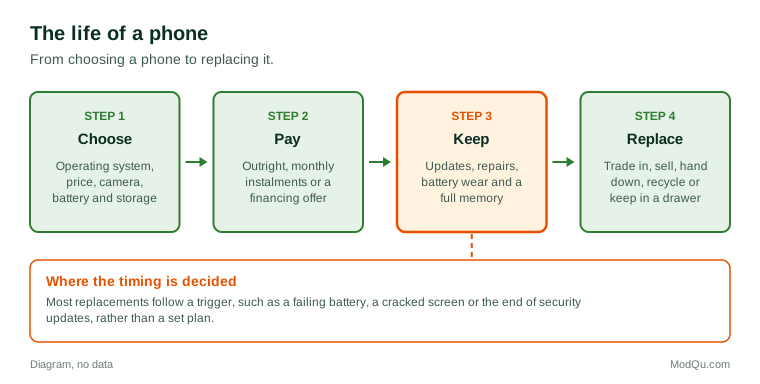
A smartphone is a pocket computer that also makes calls. It runs an operating system, connects to mobile and Wi-Fi networks, takes photos and video, and runs apps that people download from an app store. This topic covers the phone itself and the apps on it:
- Choosing and buying a phone: brand, operating system, price, size, camera and battery life.
- How the phone is paid for: outright, through a monthly instalment plan with a carrier, or as part of a financing offer from a retailer.
- How long people keep a phone and why they replace it.
- Apps: which ones people use, what they pay for, and how they find new ones.
- Screen time and habits: how much people use their phone and how they feel about it.
The mobile service plan (data, calls and texts) is a related but separate subject, covered on the internet and mobile plans topic page.
How people choose a phone
Most phones are sold on two main operating systems, and many people stay with the one they already know. Moving from one system to the other means learning a new layout, moving photos and messages, and sometimes buying apps again. That makes the operating system a stronger habit than the brand of hardware for many buyers.
The reasons people give for choosing a model usually fall into a few groups:
- Price and how it fits a monthly budget.
- Camera quality, which is now one of the main ways phones are compared.
- Battery life and charging speed.
- Size and feel, including screen size and weight.
- Storage, especially for people who keep many photos and videos.
- Trust in the brand for updates, security and resale value.
- What friends and family use, which matters for shared messaging and photo features.
Example
A parent buying a first phone for a 12-year-old compares a new low-cost model with a two-year-old phone handed down from an older sibling. They choose the hand-me-down because it runs the same parental control app the family already uses, and they put the savings toward a sturdy case and a screen protector.
How long people keep a phone
Phones used to be replaced every two years, often when a carrier contract ended. Many people now keep a phone longer. Common reasons include higher prices for new models, smaller differences between one year's model and the next, better build quality, and longer periods of software support.
People usually replace a phone because of a trigger rather than a plan:
- the battery no longer lasts a day;
- the screen cracks or the phone is lost;
- the phone stops receiving security updates;
- storage fills up and the phone becomes slow;
- a carrier or retailer offers a trade-in deal.
Example (hypothetical figures)
A buyer pays $1,200 for a phone and keeps it for four years. Spread over that time, the phone costs $300 a year. When they trade it in, they receive a $150 credit, so the net cost is $1,050, or $262.50 a year. A friend who buys a $600 phone every two years pays the same $300 a year before any trade-in.
The example shows why survey questions about upgrade cycles matter to makers and retailers: a longer upgrade cycle changes how many phones are sold each year, even if people spend about the same per year.
Apps and what people pay for them
Most apps are free to download. They earn money in other ways:
- Advertising shown inside the app.
- In-app purchases, such as extra levels in a game or a one-time feature unlock.
- Subscriptions that charge weekly, monthly or yearly for full access.
- Paid apps bought once, which are now less common.
Subscriptions have become a large part of app spending. They can be easy to start, sometimes through a free trial, and easy to forget. People often underestimate how many app subscriptions they pay for until they review their app store account or card statement.
Example
A commuter starts a free trial of a meditation app, a photo editing app and a language app in the same month. Three months later, reviewing their card statement, they find all three are still charging them. They keep the language app, which they use daily, and cancel the other two through the app store settings.
Questions that businesses want answered here include how many apps people use each week, which kinds of apps they pay for, how they found their most recent app, and what makes them delete an app.
Screen time and habits
Phones now include tools that report how long the screen is on and which apps take up the most time. Many people are surprised by the numbers. Common concerns include:
- checking the phone first thing in the morning and last thing at night;
- notifications that interrupt work, study or sleep;
- children's and teenagers' use, and what age is right for a first phone;
- handheld phone use while driving, which is against the law in every Canadian province and in many other places.
People respond in different ways. Some use focus modes and app limits, some turn off most notifications, some switch to a simpler phone for part of the week, and some decide their use is fine as it is. Schools in several provinces and other countries have set rules on phone use in class.
Example
A university student turns on a daily limit of 45 minutes for two social apps. For the first week they keep pressing "ignore limit". In the second week they move the apps off the home screen and find the limit easier to keep.
Privacy, security and updates
A phone holds banking apps, messages, photos, location history and health data, so security updates matter. Phone makers release updates for a set number of years, and after that a phone keeps working but becomes less safe. Many owners do not know how long their phone will be supported.
App permissions are another concern. Apps ask for access to the camera, microphone, contacts or location. People vary a lot in how carefully they review these requests: some allow everything, others refuse anything they do not understand. Survey research often finds a gap between how worried people say they are about privacy and what they actually allow.
What people disagree about
Smartphones raise questions where opinion is divided:
- whether children should have phones before high school;
- whether phone makers should allow app stores other than their own;
- whether new features justify higher prices;
- whether it is better to buy outright or pay monthly;
- how much screen time is too much.
These disagreements are part of why repeated surveys are useful: attitudes shift as prices, rules and habits change.
Key terms
- Operating systemThe main software that runs the phone and its apps.
- App storeThe official place to download and buy apps for a phone.
- In-app purchaseSomething bought inside an app after it has been downloaded.
- Free trialA period of free use before a subscription starts charging.
- Unlocked phoneA phone that can be used with any compatible carrier.
- Trade-inGiving an old device to a seller for credit toward a new one.
- Security updateSoftware from the maker that fixes known weaknesses.
- App permissionAccess an app asks for, such as to the camera or location.
Full glossary: mobile app development terms on EditingTests.com.
Smartphones and mobile apps vocabulary test
How well do you know the language of this topic? Try 8 quick questions. Your score is shown straight away and is not saved.
What the smartphones and mobile apps survey asks
This survey is part of ModQu's Technology at Home survey. The smartphones and mobile apps part takes about five minutes and covers:
- Which brand and operating system your current phone uses, and how you paid for it.
- How long you usually keep a phone and what makes you replace it.
- Which apps you use most and which you pay for.
- How much you spent on apps and subscriptions in the last month.
- How you feel about your screen time and any limits you use.
- How much you think about privacy and updates.
After that you can choose to continue with other short parts of the Technology at Home survey, such as internet and mobile plans or smart home devices, or stop.
Ready to take part?
Your answers help show what people really think and do. Results are only ever reported as totals; no one can see your individual answers.
Start the surveyQuestions about this survey
Who can take part?
Smartphone owners.
Do I have to give my name?
No. You may be asked for your age group, region and similar details so results can be broken down, but not your name. ModQu never asks for passwords, card numbers or account numbers.
How are the results used?
Answers are combined into totals and percentages and published in ModQu reports. Individual answers are never shown.
Is the vocabulary test part of the survey?
No. It is optional and separate, and your score is not stored.
Do I need a smartphone to take this survey?
No. You can take it on any device, and some questions apply to people who use a basic phone.