
Share your experience of online government services
Tell us which services you have used online, how easy they were and whether you would use a digital ID. Your answers are combined with other people's and reported only as totals.
Start the online government services surveyAbout 5 minutes. No account needed. You can stop at any time.
What online government services cover
Online government services are the ways people can deal with government through a website or app rather than in person, by phone or by mail. In Canada, common examples include:
- Federal: filing an income tax return and checking benefits through a Canada Revenue Agency account; managing Employment Insurance, Canada Pension Plan and Old Age Security through a My Service Canada Account; applying for some immigration services; and renewing a passport online for eligible applicants.
- Provincial and territorial: renewing a driver's licence, vehicle registration or health card; applying for a birth certificate; paying fines; and booking appointments.
- Municipal: paying property tax and water bills, applying for permits, registering for recreation programs, reporting problems through 311 and booking facilities.
Other countries offer similar services. Some, such as Estonia and Denmark, are often cited for having put most public services online with a single national digital identity.
How people sign in
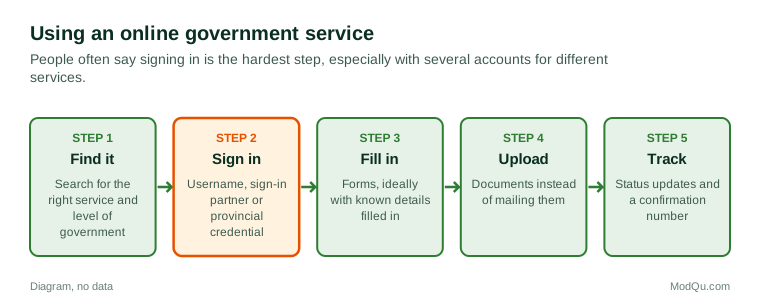
Signing in is often the hardest part of using online government services. Approaches in Canada include:
- Government-issued usernames and passwords, such as GCKey for many federal services.
- Sign-in partners, where people use their online banking credentials to prove who they are to some federal services without the bank seeing what they do there.
- Provincial digital credentials, such as accounts linked to a provincial health or services card in some provinces.
- Multi-factor authentication, such as a code sent by text message or an authenticator app.
People often have several accounts for different services and levels of government, each with its own password and security questions.
Example
A retiree wants to check their pension payments online. They try to sign in with an old government username they set up years ago but have forgotten the password and the answers to their security questions. Their adult child suggests using a sign-in partner through their bank instead. It works on the first try, and they set up multi-factor authentication with a text code.
What makes a service easy or hard
People who use online government services tend to praise or criticize the same things.
What works well:
- doing a task at any time without waiting in line;
- forms that fill in known information automatically;
- clear status updates, such as "received", "in review" and "approved";
- confirmation numbers and email receipts;
- being able to upload documents instead of mailing them.
What causes frustration:
- long, confusing forms written in technical language;
- systems that time out and lose work;
- having to enter the same information for different departments;
- websites that do not work well on a phone;
- not being able to finish online and having to call or visit anyway;
- unclear error messages.
Example (hypothetical figures)
A provincial agency moves vehicle registration renewals online. In the first year, 120,000 of 300,000 renewals are done online, or 40%. In the second year, after adding renewal reminders by email and simplifying the payment page, 195,000 of 300,000 are online, or 65%. The 25-point rise suggests the changes helped, though other factors may have played a part.
Accessibility and the digital divide
Not everyone can or wants to use online services. People who may find it harder include:
- older adults less confident with technology;
- people without reliable internet at home, including some rural and remote communities;
- people with disabilities, if websites are not designed to work with screen readers and other assistive technology;
- people with low literacy, or who are not fluent in English or French;
- people without a fixed address, a bank account or the identification needed to sign up.
The gap between people who can easily use digital services and those who cannot is often called the digital divide. Many governments keep phone and in-person options for this reason, and public libraries often help people use online services.
Example
A newcomer who speaks limited English needs to apply for a provincial health card. The online form is only in English and French. A settlement worker at a local agency helps them complete it on a library computer and explains which documents to upload. The worker says many of their clients use online services only with help.
Privacy and security
People often say they worry about how government stores and shares their personal information online. Common concerns include:
- data breaches and fraud using stolen identities;
- scam emails and texts that pretend to be from a tax agency or service department;
- how much information departments share with each other;
- whether information is kept in Canada or abroad.
Government agencies in Canada are covered by privacy laws, such as the federal Privacy Act and provincial equivalents, and privacy commissioners oversee how personal information is handled.
Digital identity
A digital ID is a secure way for a person to prove who they are online, often linked to a government record. Supporters say a single trusted digital ID would make it easier to use services, reduce fraud and save time. Critics worry about privacy, surveillance, security and the risk of excluding people who do not have or want one.
In Canada, several provinces have introduced or tested digital credentials, and the debate has been politically sensitive in some places. Surveys often find that support depends on whether the ID is voluntary, who controls the data and whether people can still use services without it.
Example
A survey asks two questions about a proposed provincial digital ID. Asked whether they would use a voluntary digital ID to renew a licence more quickly, many respondents say yes. Asked whether they would support a digital ID required for all government services, far fewer agree. The difference shows how much "voluntary" matters in this debate.
What people disagree about
People disagree about whether services should be "digital first", how much in-person and phone service should be kept, whether governments should adopt a single digital ID, and how far departments should share data to avoid asking people for the same information twice. Questions that governments want answered include which services people have used online, how easy they were and whether people would use a digital ID.
Key terms
- Digital identityA secure way to prove who you are online, often linked to a government record.
- Multi-factor authenticationA sign-in method that needs two or more kinds of proof, such as a password and a code.
- Sign-in partnerA trusted organization, such as a bank, whose login is used to access some government services.
- Digital divideThe gap between people who can easily use digital services and those who cannot.
- AccessibilityDesigning services so that people with disabilities can use them.
- PhishingFake emails or texts that try to trick people into giving personal information.
- Privacy commissionerAn independent officer who oversees how personal information is handled.
- Online portalA website where people sign in to use a range of services.
Full glossary: digital identity platforms terms on EditingTests.com.
Online government services vocabulary test
How well do you know the language of this topic? Try 8 quick questions. Your score is shown straight away and is not saved.
What the online government services survey asks
This survey is part of ModQu's Government and Public Services survey. The online government services part takes about five minutes and covers:
- Which government services you have used online in the last year.
- How easy they were to use, and what went well or badly.
- How you sign in, and how many government accounts you have.
- Whether you prefer online, phone or in-person service, and why.
- How comfortable you are with government storing your information online.
- Whether you would use a digital ID, and under what conditions.
After that you can choose to continue with other short parts of the Government and Public Services survey, such as local services or trust in government, or stop.
Ready to take part?
Your answers help show what people really think and do. Results are only ever reported as totals; no one can see your individual answers.
Start the surveyQuestions about this survey
Who can take part?
Adults.
Do I have to give my name?
No. You may be asked for your age group, region and similar details so results can be broken down, but not your name. ModQu never asks for passwords, card numbers or account numbers.
How are the results used?
Answers are combined into totals and percentages and published in ModQu reports. Individual answers are never shown.
Is the vocabulary test part of the survey?
No. It is optional and separate, and your score is not stored.