
Share how you use messaging apps
Tell us which messaging apps you use, how many group chats you are in and whether encryption matters to you. Your answers are combined with other people's and reported only as totals.
Start the messaging apps surveyAbout 5 minutes. No account needed. You can stop at any time.
What messaging apps are
Messaging apps let people send text, photos, videos, voice messages, files and stickers over the internet, and often make voice and video calls. They replaced paid text messages (SMS) for many people because they use data or Wi-Fi rather than charging per message, and they work across borders at no extra cost.
Different apps are dominant in different countries, and many people use several: one for family, another for work, another for a particular community. Messaging features are also built into social media apps, games, dating apps and workplace tools. Traditional SMS remains in use, especially for verification codes, appointment reminders and people without smartphones, and newer standards add app-like features to phone messaging.
What people use them for
- Keeping in touch with family and friends, including relatives abroad.
- Group chats for families, friends, neighbours, schools, sports teams and clubs.
- Voice and video calls, often replacing phone calls.
- Sharing photos, videos, locations and documents.
- Work communication, sometimes alongside formal workplace tools.
- Contacting businesses: booking appointments, customer service and receiving receipts or delivery updates.
- Community and news: channels and broadcast lists from organisations, local groups and media.
- Payments, in some countries where messaging apps include payment features.
Example
A grandparent who lives in a different country from their children joins a family group chat. Each day they see photos of the grandchildren, send voice messages because typing on a small screen is hard, and join a weekly video call on Sundays.
Group chats
Group chats have become central to social life. People may belong to many: immediate family, wider family, close friends, old school friends, workmates, parents from a child's class, neighbours and hobby groups.
Group chats help people organise, share news and stay close, but they bring their own issues: a constant flow of notifications, pressure to reply, messages that are hard to keep up with, being added to groups without being asked, and misunderstandings when tone is hard to read. Common habits include muting busy groups, archiving old ones and leaving groups that are no longer useful.
Example (hypothetical figures)
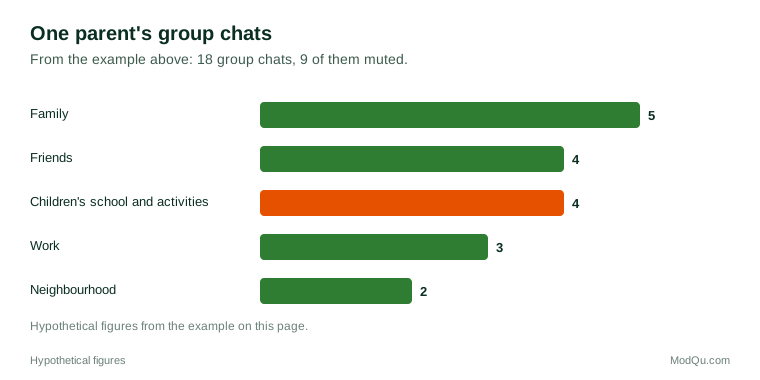
A parent counts their group chats: 18 in total. Of these, 5 are family groups, 4 are friends' groups, 4 are linked to their children's school and activities, 3 are for work and 2 are for their neighbourhood. They have muted 9 of the 18 (half), mostly the school and neighbourhood groups, which send the most messages.
Voice notes, stickers and new ways of talking
Messaging has changed how people communicate. Voice notes are popular in many countries because they are quick to record and carry tone, though some people find them slow to listen to. Emoji, stickers, GIFs and reactions add emotion and humour. Disappearing messages, which delete themselves after a set time, are used for privacy. Read receipts and "last seen" information show whether someone has seen a message, which some people value and others find stressful.
Encryption and privacy
End-to-end encryption means that messages can be read only by the sender and the recipients, not by the app company or anyone who intercepts them in transit. Several widely used apps offer it by default; others offer it only in certain modes or not at all. Encryption protects against eavesdropping, but it does not stop someone who has access to an unlocked phone from reading messages, and it does not hide all information, such as who messaged whom and when (metadata), depending on the app.
People's views on privacy vary:
- some choose apps mainly for encryption and minimal data collection;
- others choose whichever app their contacts use, and do not think about privacy;
- some worry about apps sharing data with parent companies for advertising;
- governments and law enforcement in several countries have debated whether encrypted messaging makes it harder to investigate crime, while privacy groups argue that weakening encryption would put everyone at risk.
Scams and safety on messaging apps
Messaging apps are used by scammers too. Common scams include messages pretending to be from a family member with a "new number" asking for money, fake delivery or prize messages, investment scams in group chats, and account takeovers where a criminal tricks someone into sharing a verification code. National cybersecurity and consumer protection bodies publish guidance, such as checking a "new number" message by calling the person's old number, and never sharing verification codes.
Example
A person receives a message from an unknown number saying, "Hi Mum, I dropped my phone, this is my new number, can you help me pay a bill?" They call their child's usual number, the child answers, and they report and block the scam account.
Keeping up and switching off
Many people say they find it hard to keep up with messages. Unanswered chats can cause stress, and the expectation of quick replies, signalled by read receipts and online status, adds pressure. Common coping habits include muting groups, turning off read receipts, setting a status that says they are busy, using "do not disturb" times and replying in batches. Some people deliberately take breaks from messaging, for example during holidays. Others feel they cannot switch off because family, school or work arrangements depend on the chat.
Messaging with businesses
Many businesses now use messaging apps for customer service, appointment booking, order updates and sales, especially in countries where one app is used by almost everyone. Customers value quick answers and a written record, but some dislike receiving marketing messages in the same place as family chats. Questions that businesses want answered include which apps customers prefer for contacting a company and what kinds of messages they welcome.
Key terms
- Messaging appAn app for sending messages, media and calls over the internet.
- Group chatA conversation with several people in one shared thread.
- End-to-end encryptionProtection that lets only the sender and recipients read messages.
- MetadataInformation about a message, such as who sent it and when, rather than its content.
- Voice noteA short recorded audio message.
- Read receiptA sign that shows a message has been seen.
- Disappearing messagesMessages that delete themselves after a set time.
- Verification codeA one-time code sent to confirm a person's identity or account.
Full glossary: chatbot platforms terms on EditingTests.com.
Messaging apps vocabulary test
How well do you know the language of this topic? Try 8 quick questions. Your score is shown straight away and is not saved.
What the messaging apps survey asks
This survey is part of ModQu's Digital Life and the Internet survey. The messaging apps part takes about five minutes and covers:
- Which messaging apps you use, and which one you use most.
- How many group chats you are in, and how many you have muted.
- Whether you send voice notes, and how you feel about receiving them.
- Whether encryption and privacy matter to you when choosing an app.
- Whether you have received scam messages, and what you did.
- Whether you message businesses, and for what.
After that you can choose to continue with other short parts of the Digital Life and the Internet survey, such as internet use habits or search engines, or stop.
Ready to take part?
Your answers help show what people really think and do. Results are only ever reported as totals; no one can see your individual answers.
Start the surveyQuestions about this survey
Who can take part?
Adults who own a smartphone.
Do I have to give my name?
No. You may be asked for your age group, region and similar details so results can be broken down, but not your name. ModQu never asks for passwords, card numbers or account numbers.
How are the results used?
Answers are combined into totals and percentages and published in ModQu reports. Individual answers are never shown.
Is the vocabulary test part of the survey?
No. It is optional and separate, and your score is not stored.
Are all messaging apps encrypted?
No. Some apps use end-to-end encryption by default, some only in certain modes, and some not at all. App settings and help pages explain what is protected.
Can I leave a group chat without others knowing?
It depends on the app. Some notify the group when someone leaves; others allow quieter options such as muting or archiving.