
Share how your family handles technology
Tell us when your child got a phone, what screen time rules you have and how worried you are about online safety. Your answers are combined with other people's and reported only as totals.
Start the children and technology surveyAbout 5 minutes. No account needed. You can stop at any time.
What this topic covers
Children and technology covers how children use digital devices and services, and how families manage that use. It includes:
- Devices: smartphones, tablets, laptops, games consoles, smart TVs, smart speakers and smartwatches.
- Activities: watching video, playing games, messaging friends, social media, homework and learning, creating content and video calls with family.
- Rules: how much time children spend on screens, when and where, and what they can access.
- Safety: protecting children from harmful content, contact with strangers, bullying, scams and over-sharing of personal information.
- Wellbeing: effects on sleep, activity, mood and family time.
When children get their own devices
Children's first contact with screens often comes very young, through a parent's phone or a family TV. Their own devices usually come later:
- a tablet shared within the family or given for games and learning;
- a basic phone or smartwatch for calling parents when travelling alone;
- a smartphone, often around the move to secondary school in many countries, though ages vary widely;
- a laptop for schoolwork.
Parents mention safety and contact, keeping up with friends, school needs and peer pressure as reasons for giving a phone. Reasons for waiting include concerns about social media, sleep and online risks. Some groups of parents agree together to delay smartphones so that no child is left out.
Example
Parents of an eleven-year-old who will start taking the bus to school give them a basic phone that can call and text but has no internet access. They agree to review the decision after a year, when the child asks for a smartphone like their friends'.
Screen time rules
Families set many kinds of rules. Common ones include:
- Time limits: a set number of hours per day or more time at weekends.
- Time of day: no screens before school, at meals or in the hour before bed.
- Place: devices kept in shared rooms, not in bedrooms overnight.
- Content: age-appropriate apps, games and videos only.
- Earned time: screen time after homework or chores.
- Family-wide rules that parents follow too, such as no phones at the dinner table.
Some health and education bodies publish guidance on screen time for different ages, and the advice has shifted from simple hour limits towards what children do on screens and whether it displaces sleep, activity and family time. Many parents find rules hard to enforce, especially when screens are needed for homework.
Example (hypothetical figures)
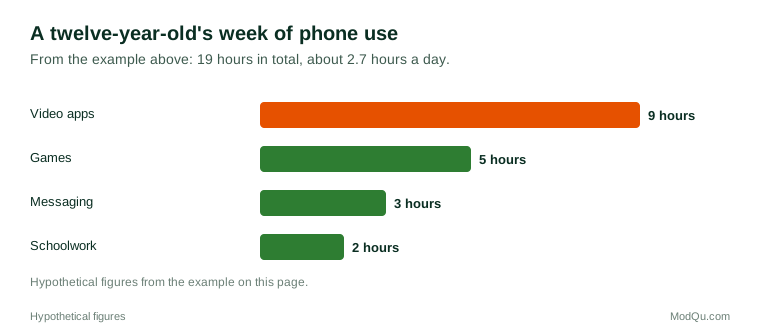
A parent checks the screen-time report on their twelve-year-old's phone for one week: 9 hours on video apps, 5 hours on games, 3 hours messaging and 2 hours on schoolwork, for a total of 19 hours (about 2.7 hours a day). Video apps take almost half (9 of 19 hours), so the family agrees a daily limit for those apps only.
Parental controls and tools
Parents can use a range of tools:
- Device and operating system settings that limit time, approve app downloads and filter content.
- Home broadband filters that block certain websites for all devices on the network.
- App-level settings, such as private accounts and restricted messaging.
- Age ratings on games and apps.
- Location sharing to see where a child is.
Children often find ways around controls, and many parents and experts say tools work best alongside conversations about what children see and do online. Some parents worry that monitoring can harm trust, especially with teenagers.
Online safety concerns
Parents' main online safety concerns include:
- Harmful content, such as violence, sexual content, self-harm or extreme views.
- Contact with strangers, including grooming by adults.
- Cyberbullying by other children.
- Privacy: sharing personal information, photos and location.
- Scams and in-app spending, including loot boxes and in-game purchases.
- Excessive use affecting sleep, homework and mood.
Several countries have introduced or proposed laws on children's online safety, such as age-appropriate design rules, minimum ages for social media accounts, and duties for platforms to reduce harm. Approaches and enforcement differ.
Example
A nine-year-old spends money on in-game items using a parent's saved card on a family tablet. The parent asks the app store for a refund, removes the saved card, and turns on a setting that requires a password for every purchase.
Technology at school
Schools use technology in many ways: digital homework platforms, school communication apps, online learning during closures, and laptops or tablets in class. Some schools provide devices; others ask families to buy them. At the same time, many schools in different countries have restricted or banned personal phones during the school day, either collecting them at the start of the day or asking pupils to keep them switched off in bags. Parents' views on these rules differ: some welcome fewer distractions, while others want to be able to reach their children.
Benefits families mention
Parents and children also describe benefits: learning apps and educational video, staying in touch with distant relatives, creative projects such as making music or videos, building digital skills needed for school and work, and finding communities around shared interests. For children with disabilities, technology can provide important communication and learning tools.
What parents and experts disagree about
- Smartphone age. Some campaign to delay smartphones until the mid-teens; others say children need to learn to use them safely with support.
- Social media. Researchers continue to debate how much social media affects children's mental health, and findings differ between studies.
- Screen time limits. Some favour strict hour limits; others focus on content and balance.
- Schools. Many schools have restricted phones during the school day; views differ on whether bans help.
- Responsibility. People disagree about how much responsibility lies with parents, schools, governments and technology companies.
Key terms
- Screen timeTime spent using devices with screens, such as phones, tablets, TVs and consoles.
- Parental controlsSettings that let parents limit or filter what children can do on a device or service.
- Age ratingA label showing the minimum suitable age for a game, film or app.
- CyberbullyingBullying that takes place through digital devices and services.
- GroomingWhen an adult builds a relationship with a child online in order to abuse or exploit them.
- In-app purchaseBuying digital items or features inside an app or game.
- Loot boxA paid in-game item that gives a random reward.
- Digital footprintThe record of a person's online activity and information.
Full glossary: child protection services terms on EditingTests.com.
Children and technology vocabulary test
How well do you know the language of this topic? Try 8 quick questions. Your score is shown straight away and is not saved.
What the children and technology survey asks
This survey is part of ModQu's Parenting and Children survey. The children and technology part takes about five minutes and covers:
- At what age your child got their own phone, tablet or other device.
- What screen time rules you have, and how well they work.
- Which parental controls or tools you use.
- How worried you are about online safety, and which risks worry you most.
- What your child mostly does on screens.
- Whether your child's school restricts phones, and what you think of that.
After that you can choose to continue with other short parts of the Parenting and Children survey, such as baby products and nappies or baby food and formula, or stop.
Ready to take part?
Your answers help show what people really think and do. Results are only ever reported as totals; no one can see your individual answers.
Start the surveyQuestions about this survey
Who can take part?
Parents of children under 16.
Do I have to give my name?
No. You may be asked for your age group, region and similar details so results can be broken down, but not your name. ModQu never asks for passwords, card numbers or account numbers.
How are the results used?
Answers are combined into totals and percentages and published in ModQu reports. Individual answers are never shown.
Is the vocabulary test part of the survey?
No. It is optional and separate, and your score is not stored.
Is there an agreed right age for a first smartphone?
No. Ages vary between families and countries, and experts disagree. Many parents consider their child's maturity, needs and what their friends have.
Do parental controls stop all risks?
No. They can reduce some risks, but children can find ways around them, and many experts recommend talking with children about what they see online.