
Share how your business handles cybersecurity
Tell us whether your business has had a cyber incident, which security tools you use and who handles IT security. Your answers are combined with other people's and reported only as totals.
Start the cybersecurity in small business surveyAbout 5 minutes. No account needed. You can stop at any time.
Why cybersecurity matters to small businesses
Many small business owners assume they are too small to be targeted. In practice, much cybercrime is automated and opportunistic: criminals send the same scam emails to thousands of businesses, scan the internet for unpatched systems and try stolen passwords at scale. A small firm with weak defences can be an easy target, and it may have less money and fewer staff to recover.
The Canadian Centre for Cyber Security, part of the Communications Security Establishment, publishes guidance for small and medium organizations, and the Canadian Anti-Fraud Centre collects reports of cyber-enabled fraud. Their materials describe the same core message: most incidents start with simple weaknesses that can be reduced with basic measures.
Common threats
The threats small businesses most often face include:
- Phishing: emails, texts or calls that trick staff into clicking a link, opening a file or giving out a password.
- Business email compromise: criminals take over or imitate an email account to request payments or change banking details.
- Ransomware: malicious software that locks or encrypts files and demands payment to restore them, sometimes also threatening to publish stolen data.
- Malware more generally, such as programs that steal passwords or card data.
- Account takeover through reused or weak passwords.
- Unpatched software and devices, including routers, websites and point-of-sale systems.
- Payment and invoice fraud, often combined with email compromise.
- Lost or stolen devices holding business data.
- Insider risks, from honest mistakes to deliberate misuse by staff or former staff.
Example
A bookkeeper at a small construction company receives an email that appears to come from a regular supplier, saying its bank account has changed. The email address differs from the real one by one letter. The bookkeeper updates the payment details, and the next invoice payment goes to the criminal's account. The company learns of the fraud two weeks later when the real supplier asks why it has not been paid.
Basic protections
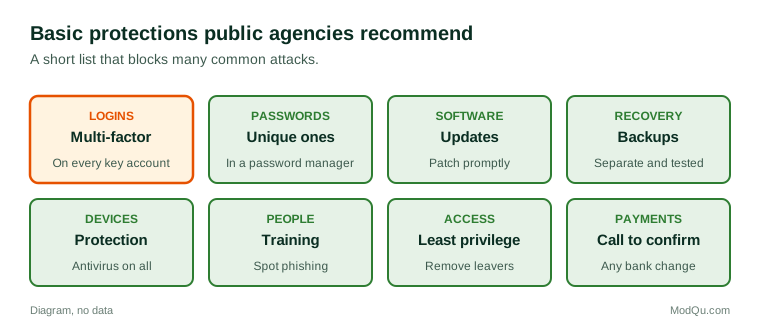
Guidance from public agencies in Canada, the United States and elsewhere tends to focus on a short list of measures that give the most protection for the effort:
- Multi-factor authentication (MFA) on email, banking, cloud and remote access accounts.
- Strong, unique passwords, often kept in a password manager.
- Software updates, applied promptly to computers, phones, routers and websites.
- Backups, kept separate from the main systems and tested to make sure they can be restored.
- Antivirus and endpoint protection on all devices.
- Staff awareness training, especially on phishing and payment requests.
- Limiting access, so staff only have the permissions they need and accounts are removed when people leave.
- Secure Wi-Fi and separate networks for guests.
- Payment checks, such as calling a known number to confirm any change to banking details.
- An incident plan: who to call and what to do if something goes wrong.
Example
After a neighbouring business is hit by ransomware, the owner of a small accounting practice spends a weekend with an IT contractor. They turn on MFA for all email accounts, set up automatic updates, move backups to a separate service with copies kept for 30 days, and give staff a one-hour session on spotting phishing. The owner says the changes cost less than one month of the practice's rent.
Who handles IT security
Small businesses handle security in different ways:
- The owner, often learning as they go.
- A staff member who is good with technology, alongside their main job.
- An outside IT contractor called when needed.
- A managed service provider, who looks after IT and security for a monthly fee.
- Software vendors, who secure the cloud services the business uses, though the business is still responsible for accounts, passwords and settings.
Many small firms have no one with clear responsibility, which can mean basic measures are never set up or are allowed to lapse.
What security costs
Security spending covers software and subscriptions, hardware such as firewalls, backup services, training, outside support and, for some, cyber insurance. Owners often find it hard to judge how much is enough, because the benefit is an incident that does not happen.
Example (hypothetical figures)
A 10-person business pays $6 per user a month for endpoint protection, $4 per user for a password manager and $80 a month for a backup service. That is $60 plus $40 plus $80, or $180 a month and $2,160 a year. It also pays $1,500 a year for cyber insurance. A ransomware incident that closed the business for a week would, the owner estimates, cost more than $20,000 in lost sales and recovery.
When an incident happens
A cyber incident may be discovered when files will not open, a ransom note appears, customers report strange emails, money goes missing or a bank flags a transaction. Common steps businesses take include:
- disconnecting affected devices from the network;
- calling an IT provider or incident response firm, and the cyber insurer if there is one;
- contacting the bank immediately if money was sent;
- changing passwords and turning on MFA;
- restoring from backups;
- reporting to police and to the Canadian Anti-Fraud Centre or the Canadian Centre for Cyber Security;
- assessing whether personal information was affected.
Under Canada's federal private-sector privacy law, organizations must report breaches of personal information that create a real risk of significant harm to the Office of the Privacy Commissioner of Canada and notify affected individuals; some provinces have their own rules. This page describes these duties in general and is not legal advice. Paying a ransom is a difficult decision, and public agencies generally discourage it because it does not guarantee recovery and funds further crime.
Trends and debates
Trends include more targeted scams using convincing language and fake voices, attacks through suppliers and software providers, insurers requiring MFA and backups before offering cover, and more small businesses using managed security services. Debates include how much responsibility should fall on software makers versus users, whether small businesses should face security requirements, and whether ransom payments should be restricted. Questions businesses want answered include how many small firms have had an incident, which measures they use, who handles security and what they spend.
Key terms
- PhishingMessages that trick people into clicking links, opening files or giving out information.
- RansomwareMalicious software that locks files and demands payment.
- Multi-factor authenticationLogging in with a password plus another proof, such as a code.
- Business email compromiseFraud using a taken-over or imitated email account to request payments.
- PatchA software update that fixes a security weakness.
- BackupA separate copy of data that can be restored after a loss.
- Managed service providerA firm that runs a business's IT and security for a fee.
- BreachUnauthorized access to, or loss of, data.
Full glossary: cybersecurity terms on EditingTests.com.
Cybersecurity in small business vocabulary test
How well do you know the language of this topic? Try 8 quick questions. Your score is shown straight away and is not saved.
What the cybersecurity in small business survey asks
This survey is part of ModQu's Business and Professional Services survey. The cybersecurity in small business part takes about five minutes and covers:
- Whether your business has had a cyber incident or scam, and what happened.
- Which security tools and practices you use.
- Who handles IT security for your business.
- What you spend on security and IT support, roughly.
- Whether you have cyber insurance.
- What would help your business feel more secure.
After that you can choose to continue with other short parts of the Business and Professional Services survey, such as small business owners or accounting and bookkeeping, or stop.
Ready to take part?
Your answers help show what people really think and do. Results are only ever reported as totals; no one can see your individual answers.
Start the surveyQuestions about this survey
Who can take part?
Small business owners and IT decision makers.
Do I have to give my name?
No. You may be asked for your age group, region and similar details so results can be broken down, but not your name. ModQu never asks for passwords, card numbers or account numbers.
How are the results used?
Answers are combined into totals and percentages and published in ModQu reports. Individual answers are never shown.
Is the vocabulary test part of the survey?
No. It is optional and separate, and your score is not stored.